Account Setup Flow — Goals / Interests (Card-Based)
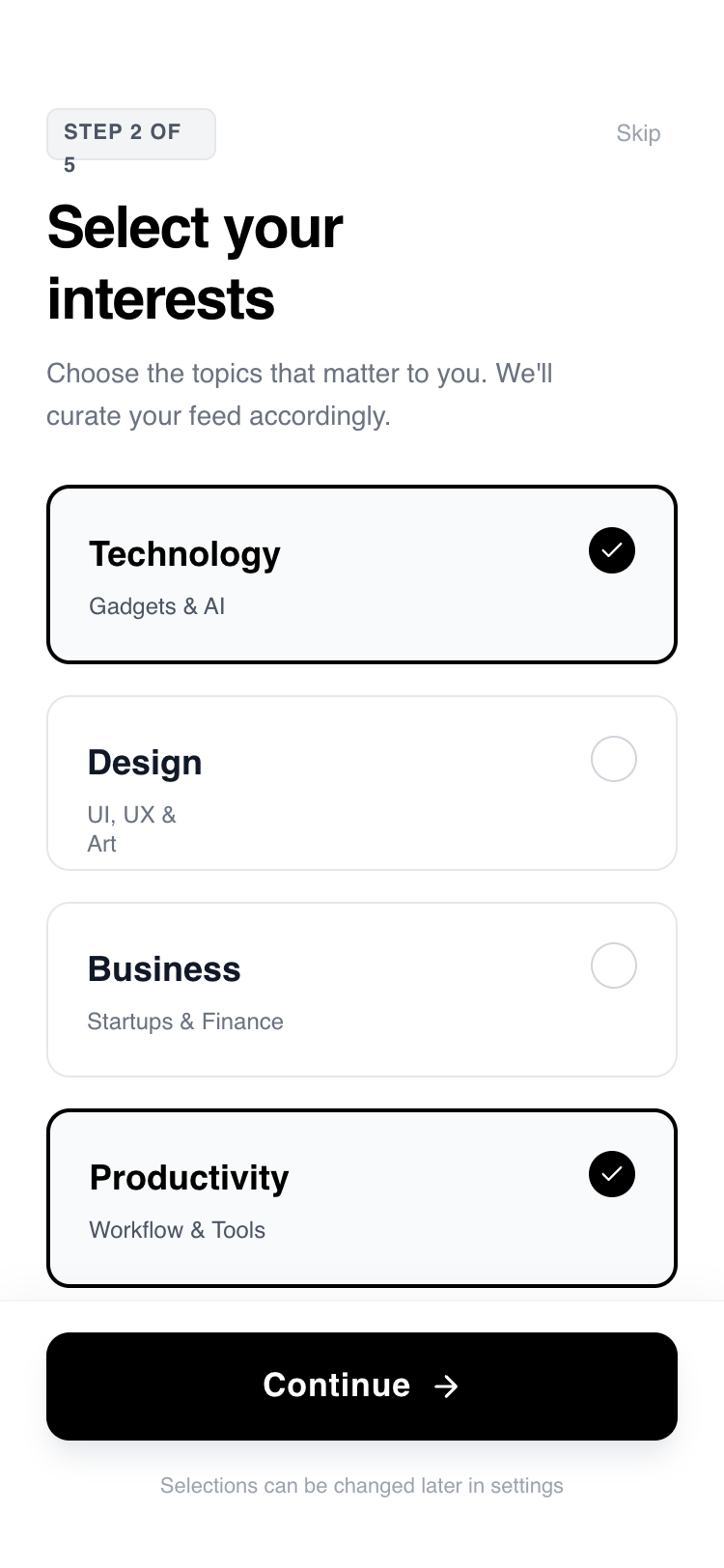
A sleek, minimalist, and highly interactive 4-step onboarding flow designed for mobile-first experiences. Features high-contrast black and white aesthetics, modern typography using General Sans, and fluid motion using the View Transitions API. Ideal for SaaS, fintech, or lifestyle apps needing a premium, frictionless user registration or configuration sequence. Key elements include a persistent progress bar, springy micro-interactions, and clear, bold editorial typography.
Summary
A minimalist, high-contrast 4-step onboarding interface with fluid motion transitions, bold 'General Sans' typography, and interactive selection cards. The design focuses on clarity, using a monochrome palette with subtle gray accents to guide users through goals, interests, profile setup, and system permissions.
Style
Modern minimalist aesthetic utilizing 'General Sans' for a clean, editorial look. Palette is strictly monochrome: Pure White (#FFFFFF), Deep Black (#000000), and a range of functional grays (#F3F4F6 for backgrounds, #9CA3AF for secondary text). Animations use the View Transitions API with custom slide-up keyframes and cubic-bezier(0.16, 1, 0.3, 1) easing for a 'snappy' but smooth feel.
Layout & Structure
A vertically stacked mobile layout consisting of a persistent progress bar at the very top, a fixed header with contextual titles, a scrollable main content area for user input, and a fixed footer with the primary action button.
Progress Bar
Header Section
Interactive Content Area
Persistent Footer
Components
Selection Card
An interactive card that serves as a single or multiple choice input.
Toggle Switch
A custom push-notification style toggle.
Special Notes
MUST maintain the high-contrast ratio for accessibility. DO NOT use rounded-full for the main CTA; use rounded-xl (12px) for a more modern 'app' feel. Transitions MUST be synchronized so that the progress bar, header text, and main content animate together using the View Transitions API or equivalent motion library. MUST include an active scale effect on all clickable elements to provide tactile feedback.