AI System Configuration Console
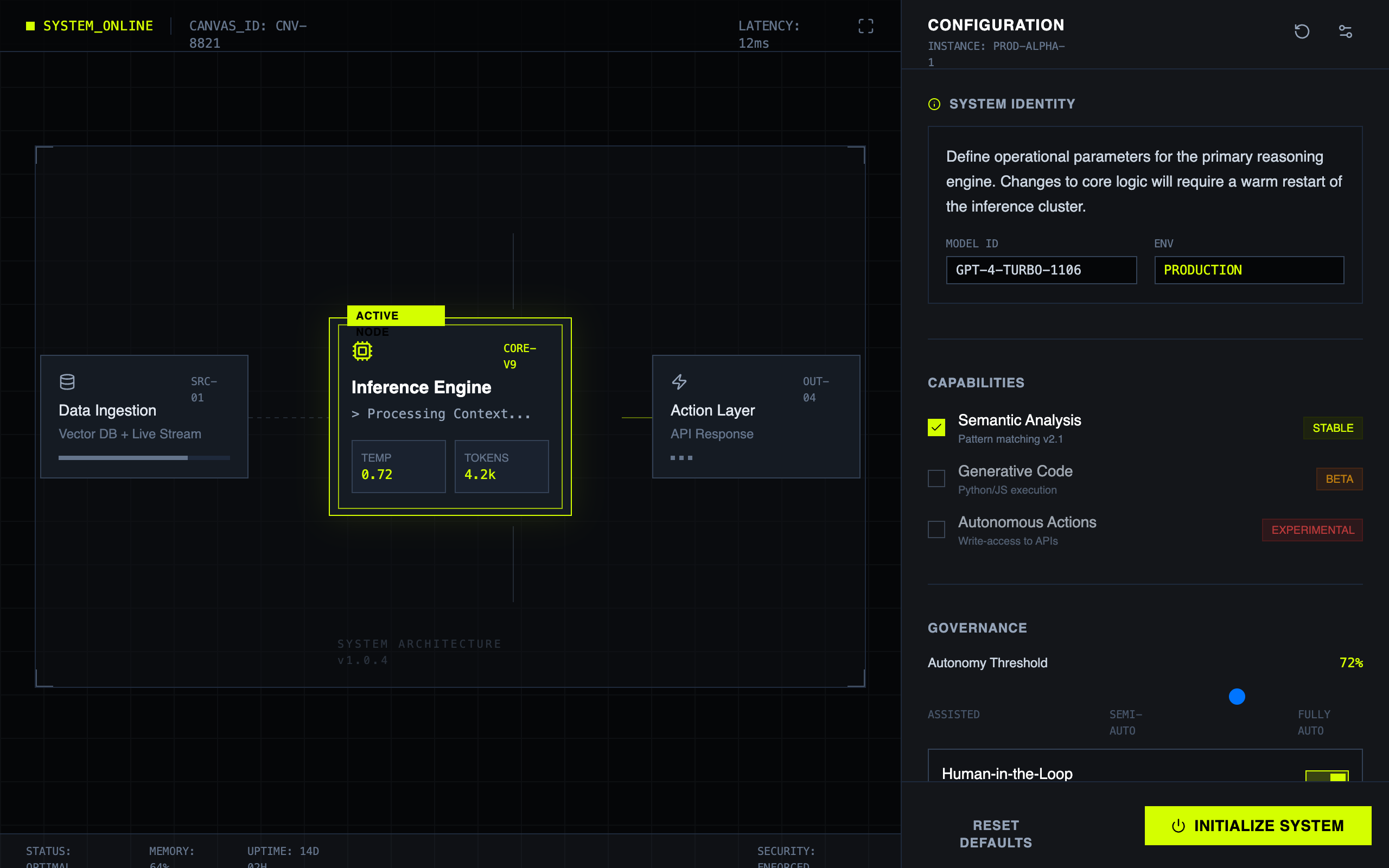
A high-fidelity AI configuration console and operating-system style interface. Features a dark slate and acid green color palette, monospaced typography, and a technical grid-based layout. Designed for SaaS backends, developer tools, AI management platforms, and cybersecurity dashboards. Includes a system canvas with nodes, a detailed inspector sidebar, terminal-style live outputs, and mechanical-inspired UI components like square range sliders and binary toggle switches. Visual Description: A brutalist dark-mode design system engineered for mission-critical AI configuration and monitoring. System-01 combines technical precision with high-contrast accessibility, featuring an operating-console aesthetic that prioritizes transparency and rapid cognitive processing over conversational warmth. Typography: * Display/UI: Inter (400–700 weight) — clean, high-legibility sans-serif optimized for UI clarity at small sizes * System Labels & Code: JetBrains Mono — monospaced font for technical credibility, system IDs, and data readout sections * Uses uppercase tracking and letter-spacing for scannable hierarchy Color Palette: * Primary Background: Deep Slate #0F1115 (base canvas) * Secondary Background: Elevated Charcoal #151B23 (panel containers, nested surfaces) * Primary Accent: Acid Green #D4FF00 (signals, active states, CTAs, warnings) * Borders & Dividers: Slate #30363D (subtle, non-dominant) * Text: Light Gray #E6EDF3 (primary), Muted Gray #8B949E (secondary labels) Design Classification: Brutalist Minimalism + HCI-Optimized + Cybernetic Interface. No gradients, no illustrations—only grid lines, system tags, and geometric clarity. Mechanical, not playful. Best Usage Scenarios: * AI/ML product dashboards and control panels * Developer tools and infrastructure UIs * Mission-critical SaaS applications * Onboarding flows for technical products * System configuration and monitoring interfaces * B2B enterprise platforms requiring credibility Theme Mode: Dark Mode (enforced, no light variant) Components Library: Inspector panels, system canvas with node diagrams, status bars, capability toggles, range sliders, action buttons, modal forms, field inputs, tabs, dividers, badges (stable/beta/experimental), terminal output blocks, custom checkboxes Animation Types: Scanline sweep (continuous screen effect), mechanical snap (button interactions with translate + shadow), pulse-ring (active node detection), data streaming (terminal text reveal), smooth range slider thumb with glow effect Accessibility: WCAG AAA contrast ratio compliance. High contrast between acid green (#D4FF00) and dark backgrounds ensures readability for color-blind users. Monospaced fonts aid focus and reduce cognitive load. Responsive: Fluid layout with 8px grid unit. Left panel (65%) canvas + right panel (35%) inspector adapts from desktop to tablet seamlessly.
Summary
A technical 'Operating Console' design system for AI configuration, characterized by high-contrast dark backgrounds, neon acid-green accents, and a rigid grid-based structure that emphasizes function and precision over aesthetics. It utilizes a 65/35 split screen with a visual system canvas on the left and a dense, scrollable control inspector on the right.
Style
The style is 'Industrial/Technical Minimalist'. It uses a strict dark theme (#0f1115) with acid green (#d4ff00) as the primary action and state color. Typography pairings use 'Inter' for UI labels and 'JetBrains Mono' for system data. Borders are sharp (0px radius), and micro-interactions use 'mechanical' snappy transitions rather than soft easing. Design elements include scanlines, corner ticks, and 1px grid overlays.
Layout & Structure
A horizontal split-screen layout. Left side is a flexible canvas for node-based visualization; right side is a fixed-width inspector for granular configuration and logs.
System Canvas (Left 65%)
Inspector Sidebar (Right 35%)
Settings Sections
Terminal Output Preview
Components
Active System Node
A highlighted node in the canvas representing an active process.
Console Range Slider
A brutalist range input for technical adjustments.
Action Trigger Button
Primary CTA button with high visibility and hover feedback.
Special Notes
MUST: Maintain 0px border-radius on all elements. Use uppercase monospaced text for all system-generated IDs. Ensure all interactions (hover, toggle) feel 'heavy' and immediate. DO NOT: Use rounded corners, soft shadows, or gradients. Avoid any imagery or photography; stick to abstract SVG icons (lucide/iconify style).