LexaFlow AI - Legal Review Hub
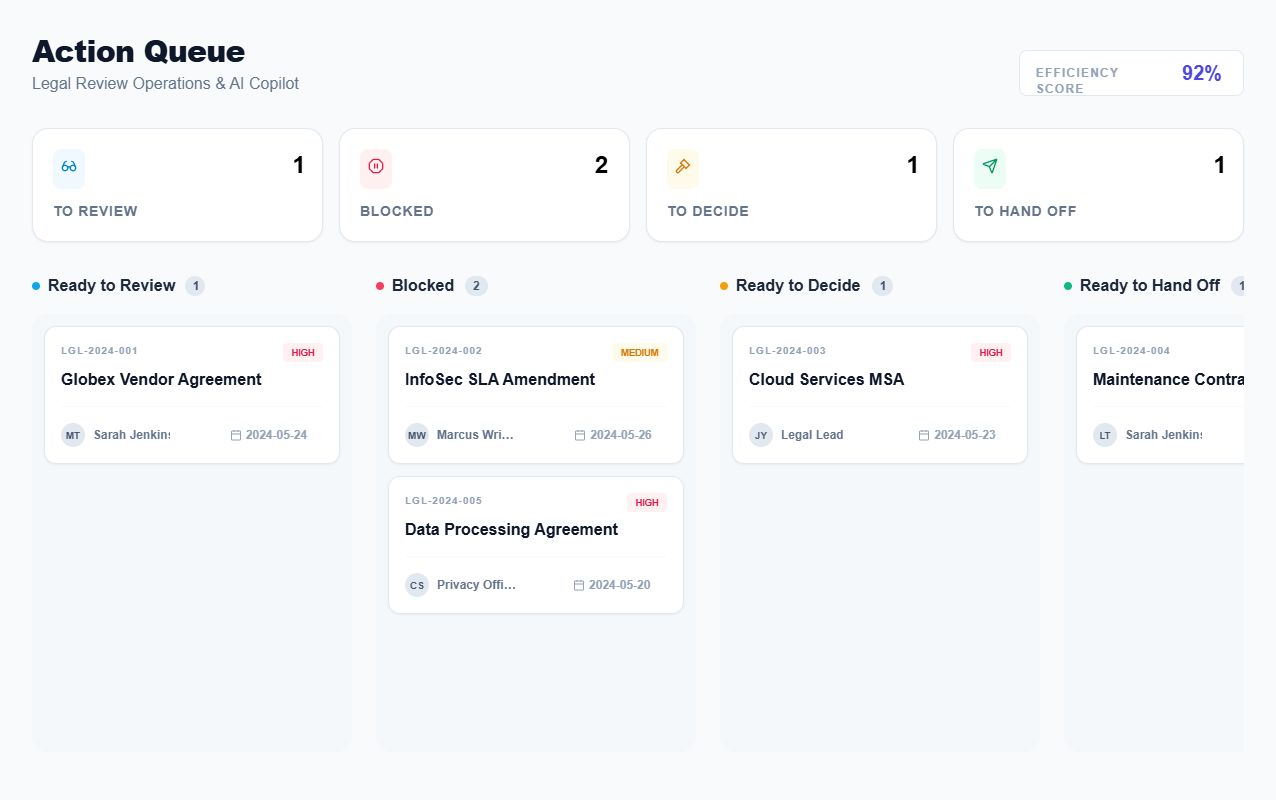
Build a FULLY FUNCTIONAL interactive prototype for an internal legal contract review app. Single-page HTML application with state management and full interactivity. STRUCTURE: 1. Start Page (Action Queue): - 4 lanes: "Ready to Review", "Blocked", "Ready to Decide", "Ready to Hand Off" - 5 realistic sample cases distributed across lanes - Click any case to open Request Details page - Triage summary bar at top shows count of cases in each lane 2. Request Details Page: - Full case information hierarchy (ID, title, priority, status, ownership, due date, context fields) - AI case brief section (clearly labeled as AI-generated) - Primary CTA (changes based on case state: Review, Unblock, Make Decision, Hand Off) - Case sections: Description, Attachments (grouped), Stakeholders, Communication Thread, Audit Log - Progressive disclosure: Secondary info in collapsible drawers/panels 3. INTERACTIVE BEHAVIORS: a) Block/Unblock Flow: - When case is blocked, UI switches to "blocked mode" (visual distinction, top accent bar) - Blocker reason is prominent - Primary CTA: "Escalate to [Owner]" or "Follow Up with [Stakeholder]" - "Unblock" button opens modal to record resolution - Clicking unblock moves case back to previous action type lane - Audit log records: who blocked, reason, who unblocked, resolution, timestamp b) Make Decision Flow: - "Ready to Decide" cases show key risk identified by AI - 3 action buttons: "Approve", "Approve with Conditions", "Escalate/Reject" - Clicking any decision opens modal with reason input field - After decision, case moves to "Ready to Hand Off" lane - Audit log records decision, reason, who decided, timestamp c) Hand Off Flow: - Shows next owner and handoff checklist - "Complete Handoff" button opens modal with pre-filled next owner - After handoff, case moves to completed state (case disappears from queue or moves to history) - Audit log records handoff info d) Audit Trail: - Full timeline of all actions: created, reviewed changes, decisions made, blocks/unblocks, handoffs - Each entry shows: action, actor, timestamp, reason/notes, AI involvement (if applicable) - Audit log is read-only and always visible in case details 4. SAMPLE DATA (5 cases): - Case 1: "Globex Vendor Agreement" - Ready to Review, HIGH priority, due in 2 days, new redline detected - Case 2: "InfoSec SLA Amendment" - Blocked, waiting on InfoSec clarification, assigned to Marcus (you're waiting on him) - Case 3: "Cloud Services MSA" - Ready to Decide, medium risk identified, needs legal judgment - Case 4: "Maintenance Contract Renewal" - Ready to Hand Off, legal review complete, going to Procurement - Case 5: "Data Processing Agreement" - Blocked, missing client input, overdue (escalation needed) 5. VISUAL DESIGN: - Modern enterprise aesthetic, clean hierarchy - Color-coded action types (blue=review, red/orange=blocked, amber=decide, green=handoff) - Use distinctive typography for scanning (Plus Jakarta Sans or similar) - Modal dialogs for confirmations and reason inputs - Toast notifications for state changes ("Case unblocked!", "Decision recorded") - Audit log uses compact timeline format (not tables) 6. TECHNICAL IMPLEMENTATION: - Use vanilla JS with DOM state management (no frameworks) - Data stored in local state (not persistent, just for demo) - Navigation between Start Page and Case Details via JS (no page reloads) - Forms with validation before state change - Real timestamps for audit entries - Progressive disclosure using data-state attributes and CSS classes CRITICAL INTERACTION REQUIREMENTS: - Block state logic: When case is blocked, "Review" button is disabled, blocker reason blocks the primary action path - Unblock modal: Requires reason input before allowing state change - Decision modal: Requires one of 3 decision options + optional reason - Handoff modal: Shows next owner, checklist status, and requires confirmation - Audit log: Always shows complete history, updates in real-time as actions occur - State persistence across page views: If user blocks a case, goes back to start page, then re-enters case, it's still blocked Enterprise focus, clear accountability, no generic dashboards.
 Use this prompt