PrecioLuzApp — Settings Tab (Light Mode)
A sophisticated iOS-inspired Light Mode design system characterized by its use of glassmorphism, soft neutral backgrounds, and a semantic traffic-light color palette. This style is ideal for utility applications, fintech dashboards, smart home controls, and high-end SaaS settings pages. It leverages a clean Inter typography system with heavy-weighted headers and subtle capitalized labels to create a clear visual hierarchy. Key features include translucent blurred surfaces, custom iOS-style toggle switches, and grouped list layouts that provide a native mobile feel within a web environment.
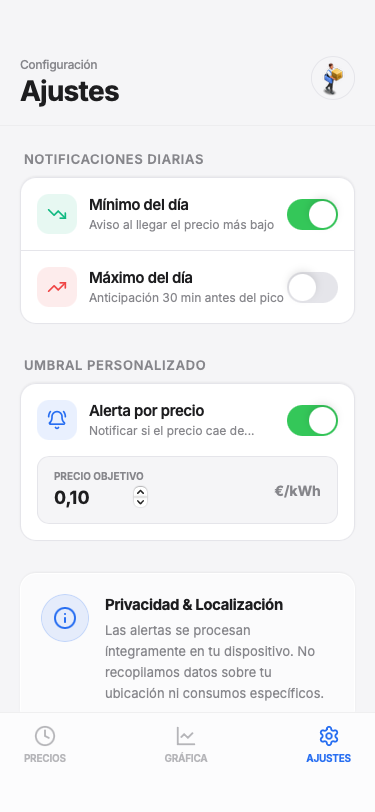
Summary
A high-fidelity iOS Light Mode interface with glassmorphism elements, clean list-based settings groups, and a vibrant semantic color system for price tracking or utility monitoring.
Style
The style is built on a neutral base of #f5f5f7 with pure white #ffffff surfaces and subtle #e5e5ea borders. It employs glassmorphism for top and bottom navigation bars (white/70 with 20px blur). Typography uses the Inter family, ranging from 10px uppercase labels to 28px bold titles. Semantic colors include Cheap Green (#10b981), Mid Orange (#f97316), and Expensive Red (#ef4444), with an Accent Blue (#276EF1) for interactive elements and brand presence. Micro-interactions include 400ms transitions on switches and active-state scaling on buttons.
Layout & Structure
A vertical-scroll layout featuring a sticky blurred header, grouped content sections with descriptive headers, and a fixed glassmorphism tab bar at the bottom.
Sticky Header
Grouped Settings Section
Custom Input Card
Information Card
Navigation Tab Bar
Components
iOS Native Toggle
Standard iOS style switch with smooth animations.
Interactive List Button
A button that looks like a list item with a hover state.