Xan CRM — Invoices List
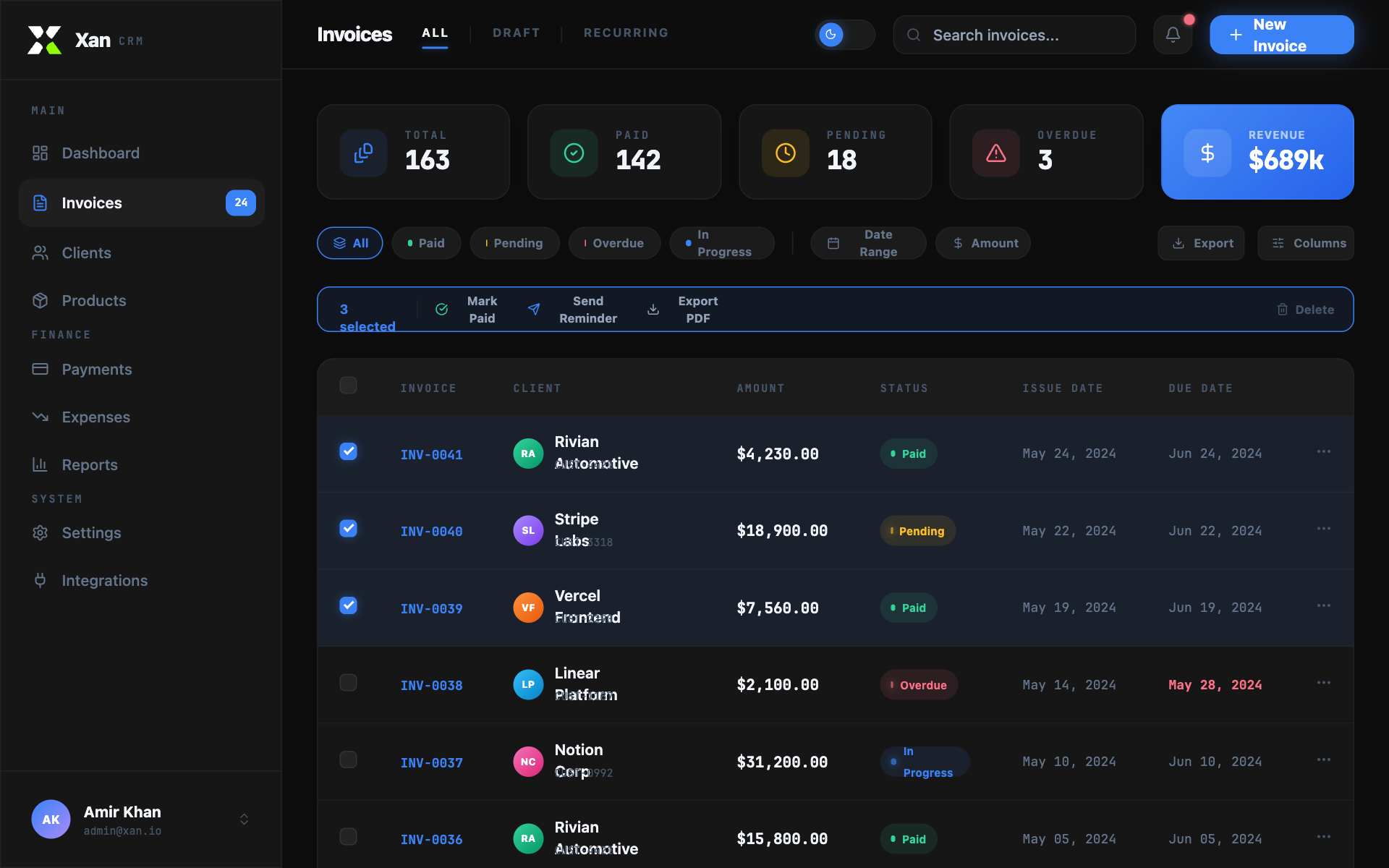
Xan CRM is a high-end, finance-oriented design system characterized by a sophisticated dark-mode aesthetic with light-mode compatibility. It features a professional 'glass-panel' look using Outfit for UI copy and JetBrains Mono for data-heavy elements. The style is ideal for fintech, SaaS dashboards, and administrative platforms. Key visual markers include subtle mouse-tracking spotlight effects, vibrant color-coded status badges with pulse animations, and high-contrast accent glows. The layout utilizes a structured sidebar and a comprehensive data table with integrated bulk actions.
Summary
A professional CRM Invoice List interface featuring a dark/light mode toggle, glassmorphic paneling, and high-precision typography. The design emphasizes data clarity through monospaced numerals and interactive elements like spotlight-hover cards and animated status indicators.
Style
The style guide centers on a tiered background system (Base #0D0D0D, Panel #161616, Elevated #1C1C1C) and a primary 'Xan Blue' accent (#3B82F6). Typography pairs the geometric 'Outfit' font for readability with 'JetBrains Mono' for financial data. Animations use a signature 'ease-smooth' cubic-bezier(0.16, 1, 0.3, 1) for transitions, including a custom mouse-following spotlight radial gradient on cards.
Layout & Structure
A classic dashboard layout consisting of a fixed 260px sidebar for primary navigation, a 64px tall header with search and theme toggles, and a scrollable main content area structured in a modular grid.
Sidebar Navigation
Header
Summary Metrics Strip
Data Table Section
Bulk Actions Bar
Components
Spotlight Card
Interactive card that highlights based on mouse position.
Status Badge with Pulse
Visual indicator for workflow status.
Special Notes
MUST maintain the JetBrains Mono font specifically for prices, IDs, and dates to ensure a technical look. MUST use the specific cubic-bezier(0.16, 1, 0.3, 1) for all hover and entrance animations. DO NOT use standard browser checkboxes; use custom-styled #333333 squares with #3B82F6 checkmarks. DO NOT use generic gray for borders; use #222222 specifically for dark mode and #E2E8F0 for light mode.