Atmy Communications Studio
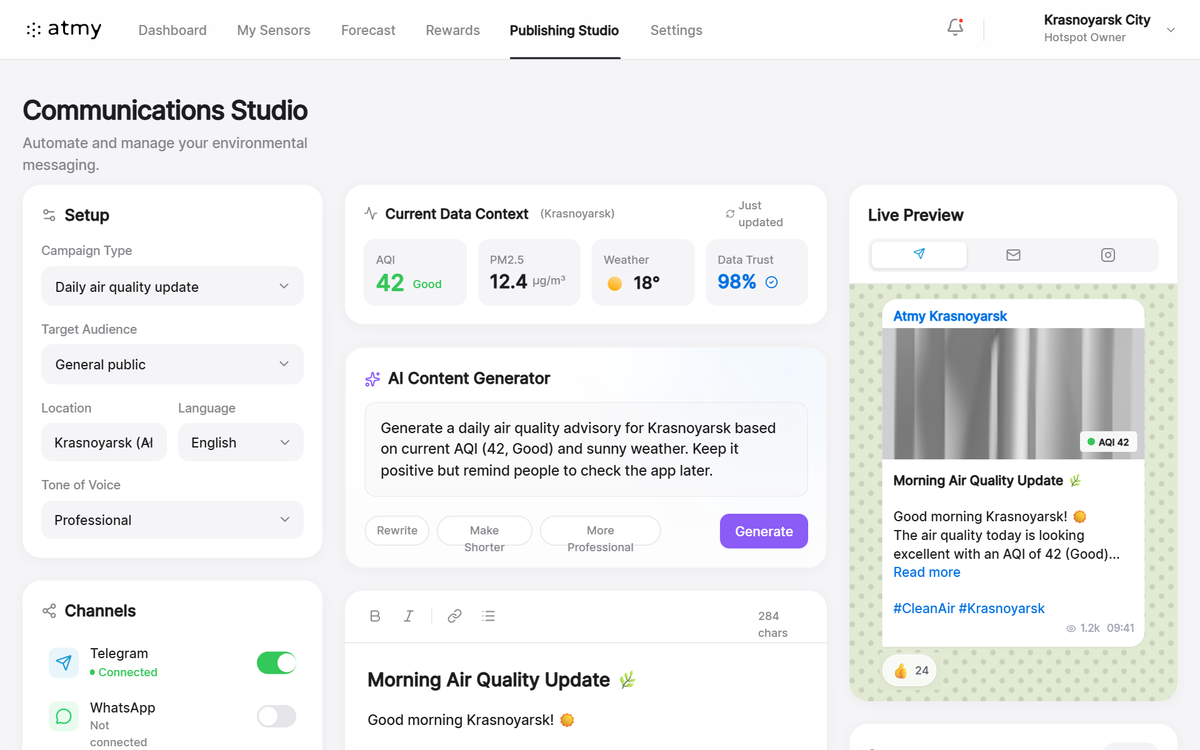
A premium Apple-inspired SaaS dashboard design characterized by its ultra-clean, minimalist aesthetic. It utilizes an Apple Mail/Weather-style interface with soft neutral backgrounds, high-contrast white cards, and a refined typographic hierarchy. The style is optimized for complex software applications requiring clarity and high professional standards, such as fintech, environmental monitoring, or marketing automation platforms. Features include 3D-effect cards with 20px border radii, glassmorphism navigation bars, and sophisticated micro-interactions for toggles and buttons. Keywords: white mode, Apple design language, minimalist SaaS, professional dashboard, environmental communications, data visualization cards, high-contrast UI, multi-channel preview.
Summary
A sophisticated, high-performance multi-column dashboard focused on publishing and communication management. It mirrors the 'Pro' look of Apple's system interfaces, emphasizing content through generous whitespace, subtle shadows, and a neutral color palette accented by functional status colors.
Style
The style is built on a foundation of 'Inter' typography and a neutral gray palette. Surfaces use a layered approach: a light gray base (#f5f5f7) with elevated white cards (#ffffff) featuring soft shadows. Accent colors follow Apple's standard human interface guidelines: #0071e3 (Blue), #34c759 (Green), and #ff3b30 (Red). Animation is restrained, focusing on 0.2s cubic-bezier transitions for hover and active states.
Layout & Structure
A responsive 3-column layout (320px | 700px flex | 350px) with a persistent sticky header and a comprehensive historical data section at the bottom.
Top Navigation
Left Sidebar (Setup Panel)
Center Workspace (Editor)
Right Sidebar (Live Preview)
Footer Section
Components
Apple iOS-Style Toggle
A physical switch component with smooth motion.
Channel Connection Card
Interactive list item showing platform status.
Telegram Simulation Bubble
Platform-specific preview component.
Special Notes
MUST: Maintain a high degree of whitespace between sections (24px-32px). USE only soft shadows to define elevation—avoid heavy borders. MUST: Use specific Apple-style iconography (Lucide/Thin weight). NOT: Do not use saturated dark colors or harsh gradients; keep the palette airy and neutral.