Design prompts for website footers
A good footer is a navigation safety net. When someone scrolls to the bottom of a page, it should hand them the next step: a scannable sitemap grouped by intent, a way to stay in touch, the social and legal links they expect, and contact details one glance away. The prompts below are the most-copied website footer designs in the Superdesign library, from dark dev-tool mega footers to editorial serif, neo-brutalist and frosted-glass variants. Open any one to see the exact prompt behind it, then change the columns, copy and brand colors and generate your own editable version in seconds.
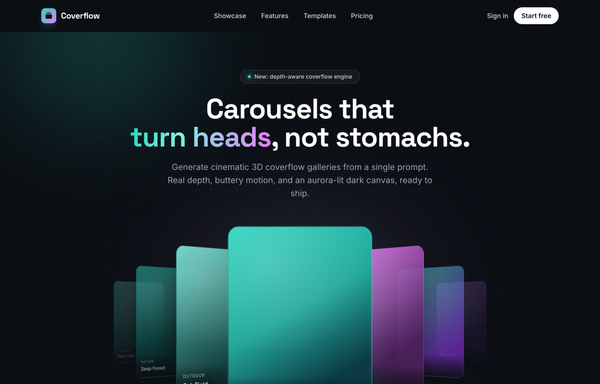
Coverflow - Carousels that turn heads (dark coverflow aurora)
A dark, aurora-lit 3D coverflow carousel landing page: a sticky frosted-ink nav, then a centered hero (a 'depth-aware coverflow engine' status pill, a big 'Carousels that turn heads, not stomachs.' heading whose 'turn heads' is teal-to-magenta gradient text, and a soft lead) wrapping a real CSS 3D coverflow stage. Seven gradient cards sit on a 1600px perspective stage: the active card faces front with a teal glow ring while neighbours rotate ~42-48deg and recede in Z, scaling and fading by distance, each card carrying a top-left sheen and a bottom gradient label. Below the stage, a round glass prev button, pill dots (active = a wide teal-to-magenta gradient bar), and a next button; clicks, dots, arrows and the left/right keys re-lay the stage. Then a CTA pair, a grayscale logo strip, a 3-up glass feature grid, a 'from prompt to motion' showcase split with a faux terminal card, a gradient-thumb templates grid, a dark gradient CTA, and a social footer. Inter + Space Grotesk fonts, near-black ink #0b0f14 ground, aqua #2dd4bf + magenta #e879f9 accents, glass panels and aurora blobs, Iconify Phosphor icons; responsive geometry drops far cards on small screens and collapses the nav into a hamburger.
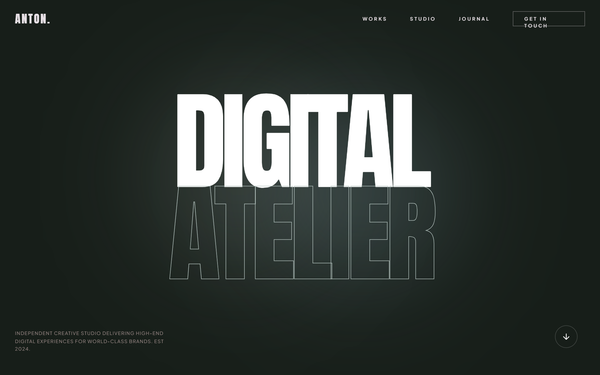
Fix Footer Email Visibility
An editorial-inspired design system blending brutalist typography with high-end engineering aesthetics. It features high-contrast color palettes (navy, deep teal, and taupe), massive display titles, and sophisticated micro-interactions. Suitable for high-tech industries, AI research labs, engineering firms, premium SaaS platforms, and architectural studios that require a sense of scale and precision.
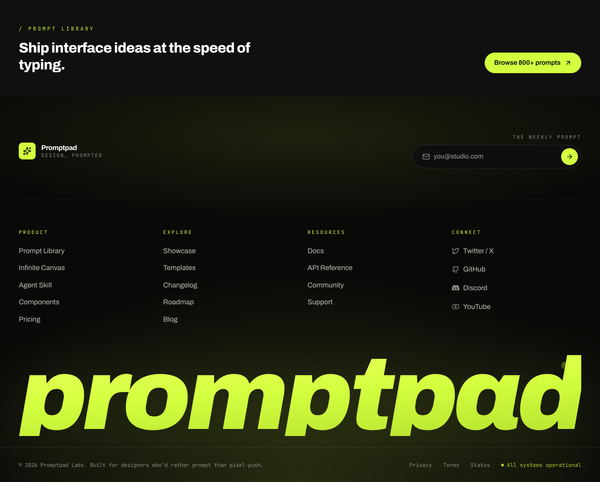
Acid-Lime on Ink Giant-Wordmark Footer
Frameless near-black footer with an acid-lime accent, four-column link grid, newsletter pill, and an edge-to-edge italic giant wordmark above the legal bar.
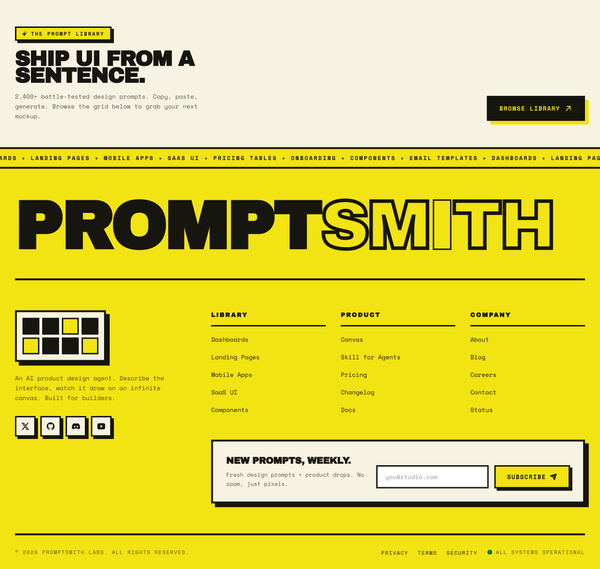
Acid-Yellow Neo-Brutalist Mega Footer
Neo-brutalist acid-yellow mega footer with hard offset shadows, a giant hollow-stroke wordmark, a marquee, three link columns, and a newsletter card.
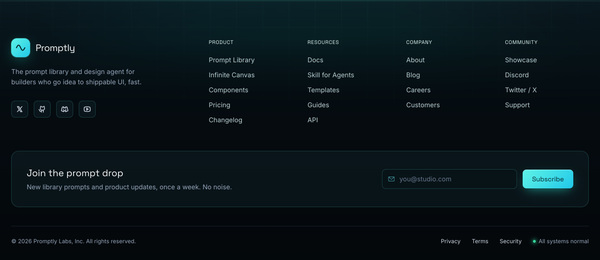
Aqua Aurora Frosted-Glass Footer
A dark teal-black frosted-glass footer with an aqua aurora crest at the seam, a 4-column link grid, brand block, newsletter band, and a status-pill legal bar.
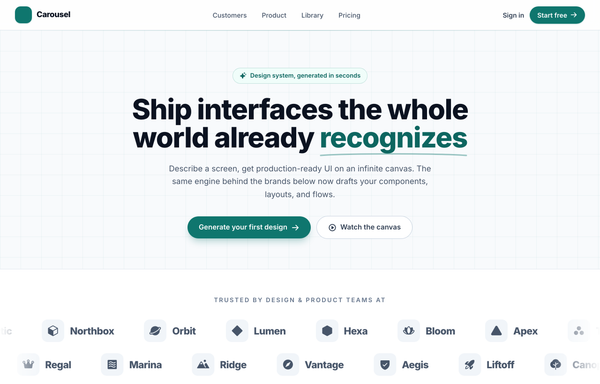
Carousel - Logo Marquee (teal)
A clean, light SaaS landing page built around an infinite logo-marquee carousel: a sticky frosted white nav (a teal rounded-square carousel-icon logo + a 'Carousel' wordmark, a hidden-on-mobile link row -- Customers / Product / Library / Pricing -- a ghost 'Sign in' link and a solid teal 'Start free' pill, plus a mobile hamburger), then a centered grid-textured hero (a teal 'Design system, generated in seconds' status pill, a big 'Ship interfaces the whole world already recognizes' heading whose 'recognizes' is teal with a hand-drawn SVG underline swash, a soft lead, and a primary teal 'Generate your first design' button + a ghost 'Watch the canvas' button). The anchor section is a two-row trusted-by logo marquee: 'Trusted by design & product teams at', then two edge-faded infinite-scroll rows of icon+wordmark logo chips (the top row scrolls left at 40s, the bottom row scrolls right at 28s), each row duplicated twice so the CSS translateX(-50%) loop is seamless, with a left/right transparent mask fade at the edges and a hover-to-pause + per-logo teal tint. Below it: a 4-up metric trust strip (57k+ / 2.4M / 4.9/5 / 12s) in a hairline-divided rounded card, a 3-up feature grid (Prompt to mockup / Infinite canvas / Clean export), a teal gradient CTA card with corner glow blobs, and a social footer. Inter font, teal #0f766e + #0d6660 + #115e59 accents on a slate #f8fafc ground, Iconify Phosphor icons, and a responsive reflow that collapses the nav into a hamburger.
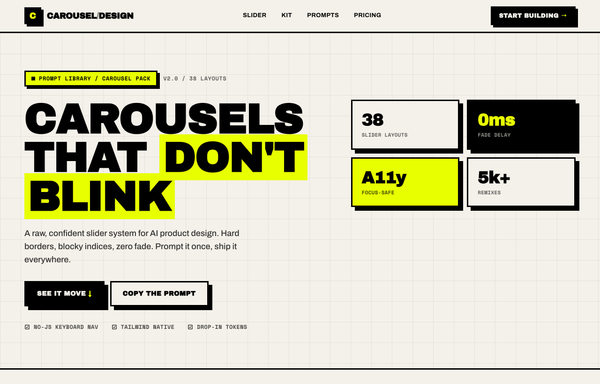
Carousel Design - Brutalist Slider
A raw neo-brutalist slider carousel built as a complete one-screen 'Carousel/Design' landing on an off-white paper palette (#f4f1ea) with pure-black ink and a single acid-yellow accent (#e8ff00). Hard 3px black borders, blocky offset drop shadows (8px 8px 0 #000), heavy Archivo Black uppercase headlines and Space Mono labels. A sticky paper nav with a square 'C' logo sits over a grid-paper hero (a 'CAROUSELS that don't blink' headline with an acid highlight + a 2x2 brutalist stat-slab grid). The centerpiece is a no-JS radio-driven BRUTALIST SLIDER: a bordered slide panel with a hard acid+ink offset shadow, chunky square prev/next arrow buttons, an oversized blocky numeral index in an inverted ink/acid slab, and a row of 3 square index buttons; three slide layouts (acid 'Stacked panel', paper 'Split feature', inverted-ink 'Invert hero') snap with zero fade. Below: a scrolling ink marquee strip, a 6-up bordered feature 'Kit' grid, a 'prompt.txt' code slab with acid-highlighted tokens, a 3-tier brutalist pricing grid, an acid CTA band and a paper footer. Archivo / Archivo Black / Space Mono, Iconify Phosphor icons, tactile press (buttons travel on click), fully responsive.
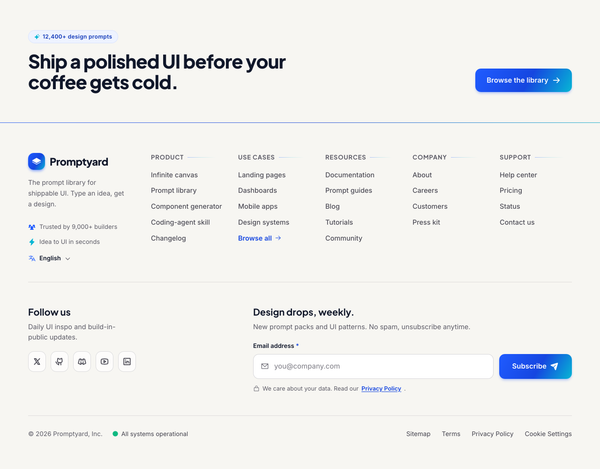
Cobalt & Paper Mega Footer
A warm-paper mega footer with a cobalt-to-cyan duotone hairline, five link columns, a social row, and a newsletter signup that collapses to mobile accordions.
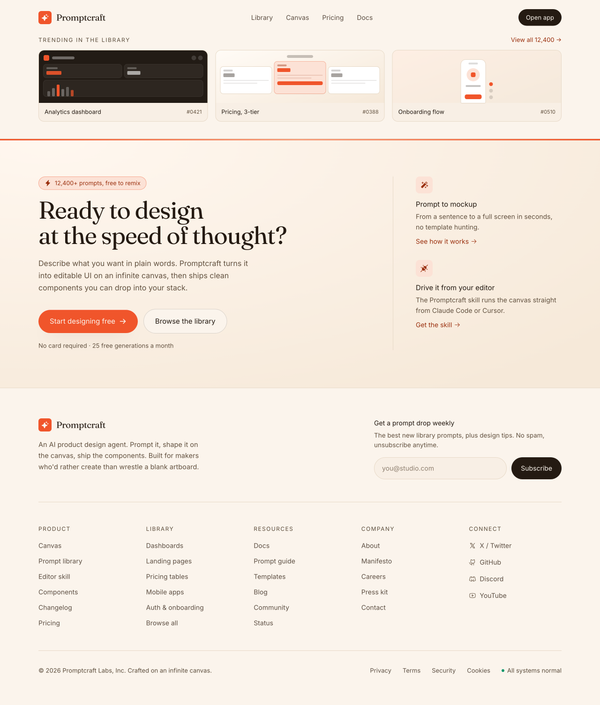
Cream Paper & Coral Mega Footer
A warm cream-paper mega footer with a coral hairline edge, Fraunces serif CTA band, newsletter capture, a five-column link grid, and a status-pill legal bar.
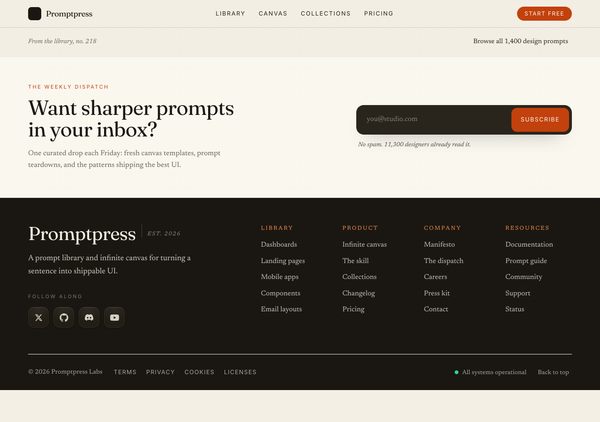
Ember & Cream Editorial Serif Footer
Warm cream-and-ink editorial footer with a Fraunces serif wordmark, ember accents, a newsletter band, four serif link columns, and a status-pill legal bar.
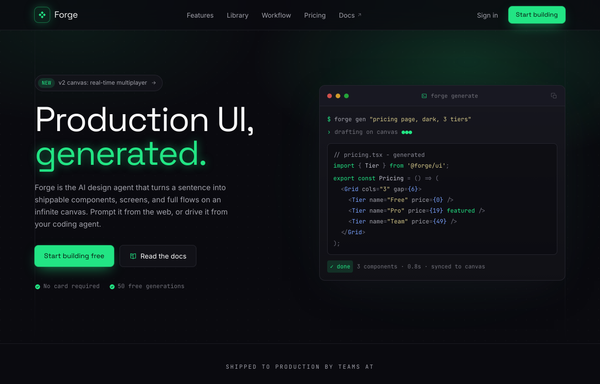
Forge - UI, generated (electric-dark dev-tool)
A premium electric-dark developer-tool SaaS landing page for an AI design agent: obsidian near-black surfaces lit by a single acid-green accent, a sticky glass nav, terminal/code mock hero, logo cloud, workflow code panel, 3-column feature grid, alternating product shot, 3-tier pricing, glowing CTA band, and a mega footer.
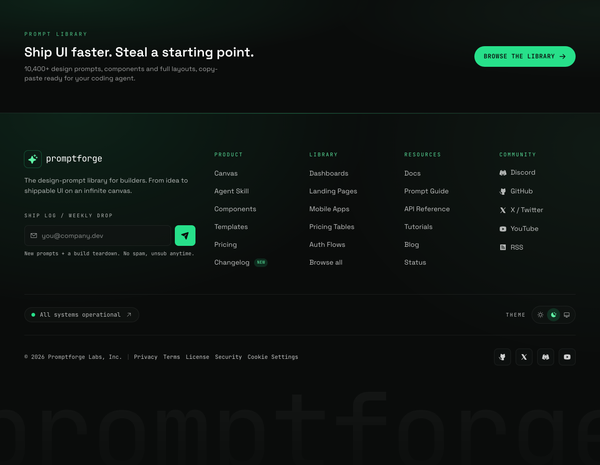
Ink & Acid Mono Sitemap Footer
A near-black ink footer with acid-green accents and mono labels: four link columns, a newsletter, a live status pill, and a giant ghost wordmark.
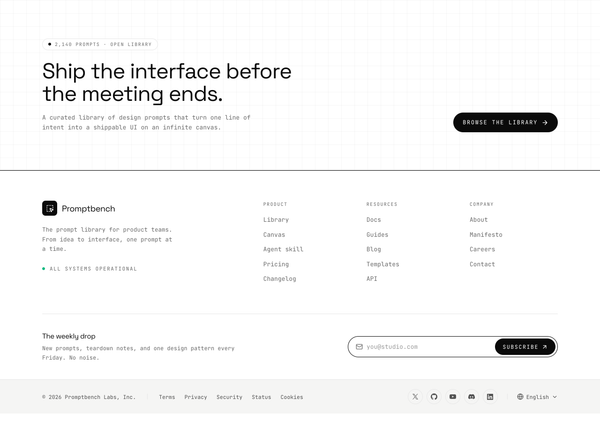
Ink & Paper Mono Slim-Bar Footer
A monochrome ink-on-paper footer with a four-column mega grid, mono type, newsletter pill input, and a slim legal row with socials and a language switch.
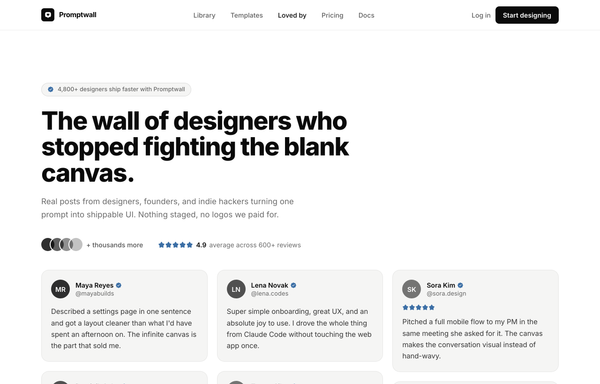
Loved by builders - Promptkit testimonial wall (mono tweet wall)
A calm Twitter/X-style 'wall of praise' testimonial section on clean white with warm-grey tweet cards, monochrome initials avatars and a single muted slate-blue accent for stars and verified ticks, laid out as a responsive CSS-columns masonry under a sticky nav, with an aggregate '4.9 average' trust row and a closing 'add your post to the wall' CTA. Inter, Iconify Solar.
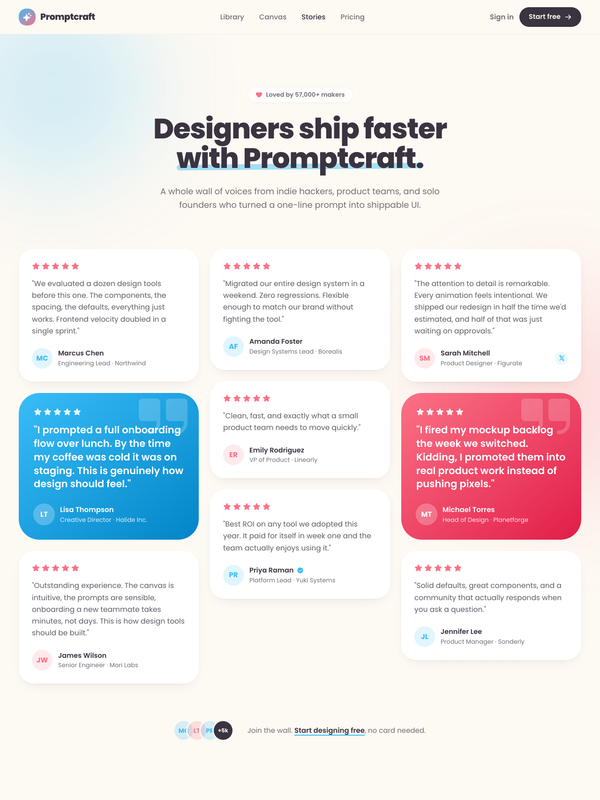
Loved by makers - a pastel masonry wall of designer voices
Bright pastel testimonial MASONRY WALL section for a prompt-to-UI product: a sticky frosted-cream nav, a centered header (heart 'Loved by 57,000+ makers' chip + a Poppins extrabold headline whose tail sits over a hand-drawn sky highlight swipe), and a true CSS-columns masonry wall (1/2/3 responsive) of testimonial cards, mostly plain white with two oversized HIGHLIGHTED gradient cards woven in (one sky #38bdf8, one coral #fb7185) carrying white text, a giant corner quote-mark and a glassy avatar. Coral five-star ratings, initials avatars, a sky verified seal + an X-share badge, and a footer CTA strip (overlapping +5k avatar cluster + 'Join the wall. Start designing free'). Soft pastel shadows with hover lift over a dotted-grain + ambient sky/coral glow ground. Poppins, Iconify Phosphor icons, vanilla-JS hamburger menu.
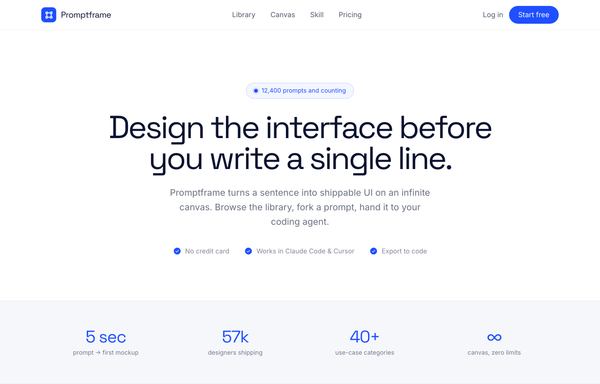
Promptframe - Full-Bleed Color-Block Cobalt CTA
Confident color-block SaaS landing built from full-bleed bands (white to paper gray to ONE loud cobalt to dark ink), Space Grotesk tight-tracked headlines over Inter body, anchored by a saturated cobalt CTA band with dot-grain texture, soft white and deeper-cobalt glows, and a white drop-shadow pill button.
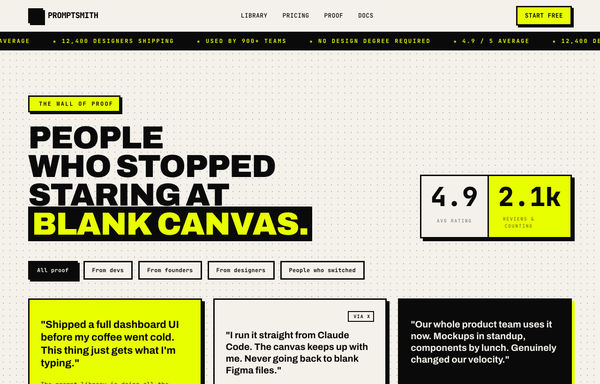
PROMPTSMITH // People Who Stopped Staring at Blank Canvas
Loud neo-brutalist testimonial 'wall of proof' section for a prompt-to-UI product, on warm paper #f4f1ea with near-black ink #0a0a0a and ONE electric acid-lime accent #e8ff00. A sticky paper nav (ink + acid lightning logo, mono links, acid 'Start free' pill) over an ink->acid scrolling rating MARQUEE, then over a dotted-grain ground: a four-line Archivo-black headline ('PEOPLE / WHO STOPPED / STARING AT / BLANK CANVAS.' with the last line knocked out acid-on-ink) beside a two-cell 4.9 / 2.1k stat block, a row of filter pills, and a responsive 1/2/3-col grid of neo-brutalist testimonial cards (3px ink borders + 6px HARD offset shadows: a paper star card, an acid feature card, an inverted ink card with an acid hard-shadow, an acid pull-quote card with a giant quote glyph) with 'via X' + verified-seal trust accents and square ink/acid initials tiles. Closes on an inverted ink CTA strip ('GOT A WIN TO SHARE?' + an acid 'Leave a testimonial' pill). Archivo + JetBrains Mono, Iconify Phosphor, CSS marquee.
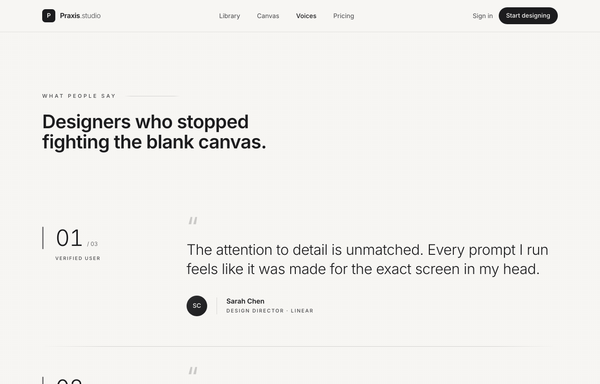
Quiet Praise - Minimal Mono Testimonial Section
A quiet, monochrome editorial testimonial section laid out as a numbered vertical quote rail of three large light pull-quotes on warm off-white paper, with hairline dividers, per-row left accent bars that grow on hover, faded opening-quote glyphs, gradient-ink initials avatars and extreme wide-tracked micro-type. No color accent. Inter, Iconify Lucide.
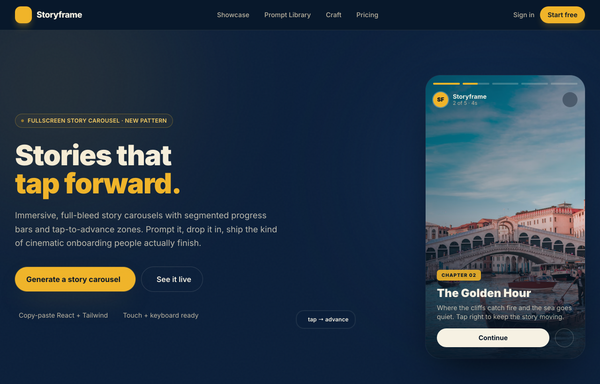
Storyframe - Stories That Tap Forward
A cinematic, full-bleed fullscreen story carousel built as a complete one-screen 'Storyframe' landing on a deep-navy palette with a single amber accent and warm cream text. A sticky translucent navy nav over a two-column hero: a 'FULLSCREEN STORY CAROUSEL . NEW PATTERN' pill eyebrow with a pulsing amber dot, a black 'Stories that tap forward.' headline (amber highlight), a cream intro and a 'Generate a story carousel' / 'See it live' button pair, beside the centerpiece: a 9/16 phone-shaped story-card mock with five segmented progress bars across the top (one animating on a 5s fillbar keyframe), a story meta row (an 'SF' avatar + 'Storyframe' + '2 of 5 . 4s'), left/right tap-to-advance zones that reveal a circular arrow on hover, and a bottom caption block (a 'Chapter 02' amber tag, a 'The Golden Hour' title, a Continue + bookmark button row), with a floating 'tap -> advance' accent card. Below: a trust strip, a 'Showcase' three-up full-bleed story-card gallery (each reusing the segmented-bars + tag + caption pattern), a full-bleed 'Prompt Library' two-column section with a 'story-carousel.prompt' code card, a 6-up bordered 'Craft' feature grid, a full-bleed gradient CTA panel and a navy footer. Inter throughout, Iconify Solar icons, immersive and cinematic.
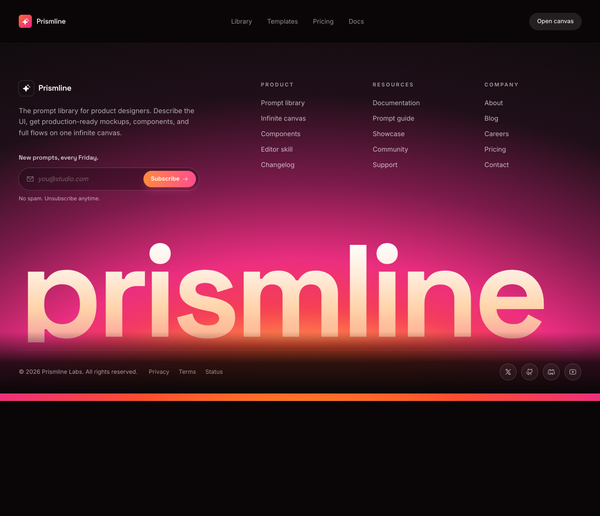
Sunset Glow Wordmark Mega Footer
A dark mega footer with a radial orange-to-magenta sunset glow, a giant gradient wordmark, newsletter capture, three link columns, and a legal bar.
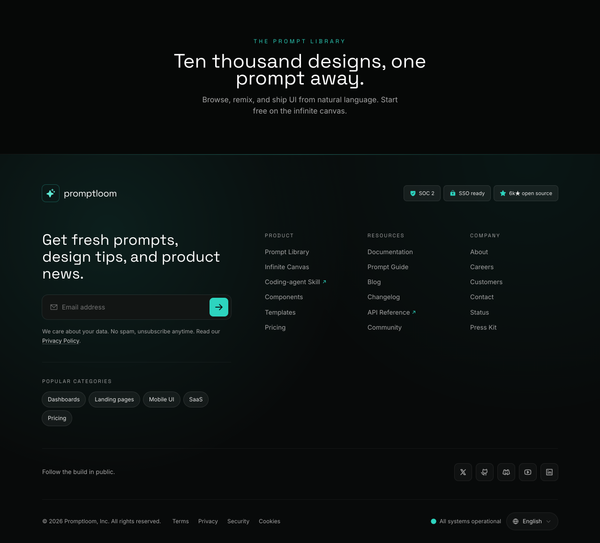
Teal-on-Ink Newsletter Mega Footer
A dark near-black footer with a teal accent, prominent newsletter capture, three link columns, social row, status pill and language switch, fully responsive.
How to prompt a website footer that looks designed, not generated
An AI design agent has a strong default for a footer, and most of those defaults waste the slot: one centered link row, no newsletter, a lone copyright line, an indigo gradient and the Inter typeface. A good prompt is really a list of constraints that override those defaults. Here is each default to override, the words that do it, and a template that bakes them all in.
Design a [dark or light] full-bleed website footer for [the product] that sends visitors to their next step.
Sitemap: [3 to 5] titled columns grouped by intent, for example Product (Features, Pricing, Changelog), Developers (Docs, API, Status), Company (About, Careers, Contact), Legal. Use real labels, not "Resources".
Newsletter: a minimal email-only capture with a clear heading and an action-specific button like "Get product updates", not "Submit".
Brand and contact: a logo or wordmark, a one-line description, and contact details so people can reach you.
Social and legal bar: a real social icon row, plus a legal bar with the copyright, privacy, terms and cookie links.
Responsive: columns stack on tablet and collapse into accordions on mobile, with a tap target on each section.
Style: a neutral base with one [accent] color used only for links and the newsletter button. Typeface [name], not the default. No indigo gradient, no frosted-glass unless asked.
Accessibility: wrap it in a native footer landmark, and keep link text at a readable contrast.
Structure and grouping
Default: It drops one cramped centered row of ungrouped links with vague labels, so the footer is hard to scan and points nowhere in particular.
Constrain it: Ask for a multi-column sitemap grouped by intent, each column with a clear title and real link labels like Pricing, Docs, Changelog and Contact.
Newsletter capture
Default: It leaves out any signup, so the footer captures nothing and gives a returning reader no way to stay in touch.
Constrain it: Ask for a minimal email-only newsletter capture with a clear heading and an action-specific button, not a generic "Submit".
Social row and legal bar
Default: It prints a lone copyright line and skips the social links and the privacy, terms and cookie links a real footer needs.
Constrain it: Ask for a real social icon row plus a legal bar with the copyright, privacy, terms and cookie links laid out clearly.
Color and type
Default: Left alone it reaches for an indigo-to-purple gradient and the Inter typeface, with color used as decoration rather than to guide the eye.
Constrain it: Name a typeface and one accent color on a neutral base, and reserve that accent for links and the newsletter button.
Responsive reflow
Default: It builds a desktop-only grid that does not reflow, so the footer becomes a cramped, unreadable block on a phone.
Constrain it: Ask for the columns to stack on tablet and collapse into accordions on mobile, with a tap target on each section.
Frameless full-bleed
Default: It floats a boxed footer inside page margins, so it reads as a detached card rather than the foot of the page.
Constrain it: Ask for a frameless, full-bleed footer that spans edge to edge and anchors the bottom of the layout.
Frequently asked questions
What should a website footer include?
A scannable sitemap grouped into titled columns by intent, contact details, a legal bar with copyright, privacy, terms and cookie links, real social links, and usually a minimal newsletter signup. Treat it as a navigation safety net for anyone who scrolls to the bottom, not just a place to park a copyright line.
What is a mega footer?
A mega footer, sometimes called a fat footer, is an expanded footer with several organized columns of the most important links plus extras like a newsletter capture, contact info and social links. It works well for larger sites because it acts like a second global navigation, as long as the columns are grouped and clearly titled rather than stuffed with every link.
How many columns should a footer have?
Three to five titled columns is the common sweet spot. Fewer forces awkward grouping, and many more turns the footer into a wall that nobody can scan. If you genuinely have a lot of links, collapse the less-used sections or move them to a dedicated sitemap page rather than cramming everything in.
How do you make a footer responsive on mobile?
Let the desktop columns stack vertically on tablet, then collapse the dense sections into tap-to-open accordions on mobile so the footer does not become an endless scroll. Keep one consistent interaction style, give each section a clear header, and make sure the tap targets and text stay large enough to use on a phone.
Why does my AI-generated footer look generic?
Because a vague prompt gets the model defaults: an indigo-to-purple gradient, the Inter typeface, one cramped centered link row, generic Product and Resources columns with placeholder links, and a lone copyright line. Name your real sections and labels, ask for a newsletter capture and a proper legal bar, set one accent color on a neutral base, and pick a named typeface, and it stops reaching for the average.
How do you write a prompt to generate a website footer?
Describe the job, not the vibe: the real sitemap columns and labels, a newsletter capture, the social and legal links, how it should reflow on mobile, and one accent color on a neutral base with a named typeface. The template above walks through each part, and you can open any example here to see a full prompt that works. Stuck on something? Ping us and we will sort it out together.