Modal — the command palette your users deserve
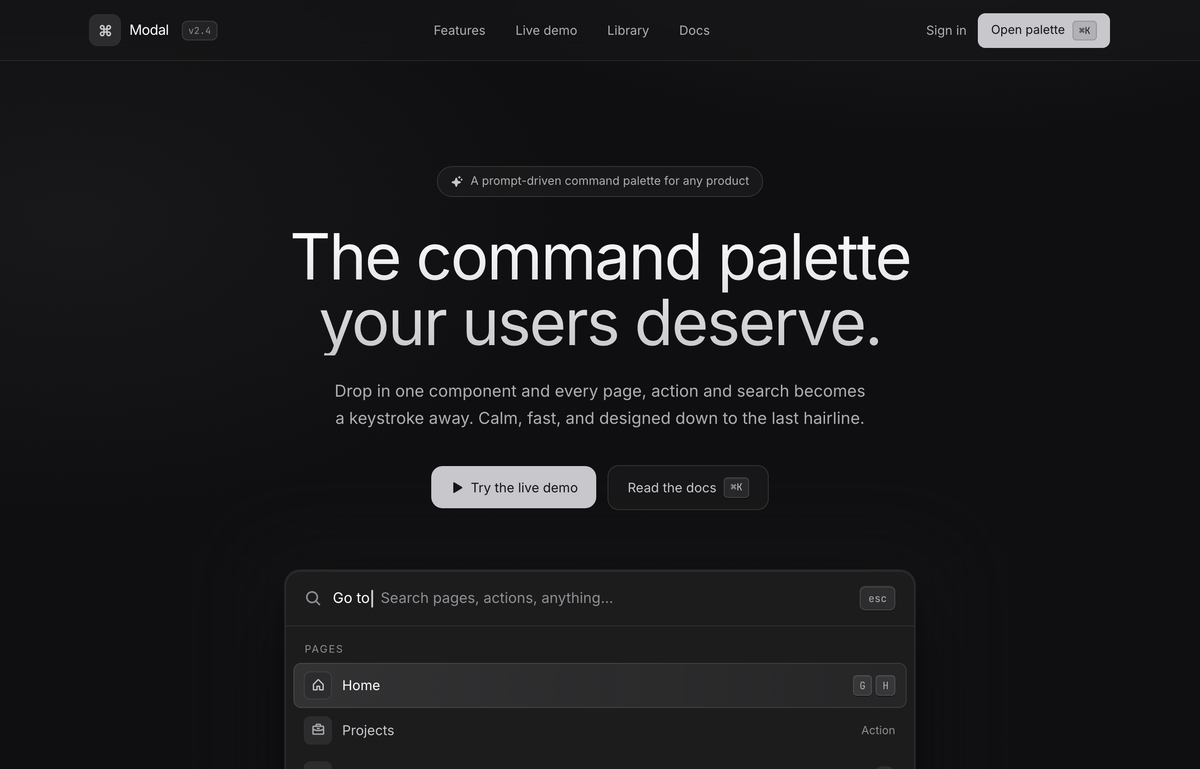
A calm graphite dark command-palette landing page on a near-black canvas lit by two faint platinum washes: a focused ⌘K palette floats as the hero centerpiece (deep multi-layer shadow, live search with a blinking caret, a grouped Pages/Actions/News list of icon rows with mono keycaps, and a hint bar), over a sticky blurred nav, a hairline-divided features band + mono stat strip, a radial-lit npm-install CTA, and a footer. No accent hue — hierarchy is all platinum-on-graphite, Inter for UI + JetBrains Mono for every keycap and numeral.
Summary
A full command-palette landing page rendered in a calm graphite dark theme on a near-black canvas (#0e0e10) lit by two faint platinum radial washes: a sticky blurred nav, an editorial hero where a focused command palette (the '⌘K' overlay) sits as the centerpiece, then a 'Features' band of three glass cards over a hairline stat strip, a radial-lit 'Library' CTA card with a copyable npm install line, and a hairline footer. The palette itself is the product: a rounded-2xl graphite card with a deep multi-layer shadow, a live search input with a blinking caret, a scrollable grouped list (Pages / Actions / News) of icon rows with right-aligned keyboard shortcuts, a featured 'News' card, and a bottom hint bar (↑↓ navigate · ↵ select · powered by Modal). Built on a single platinum-on-graphite palette (#c7c7cc / #aeaeb2 / #8e8e93 over #161618-#363638 surfaces) with Inter for UI/body and JetBrains Mono for every keycap and numeral; depth comes from hairline white/8 borders, a faint SVG grain, inset top highlights, and one deep palette shadow rather than any color.
Style
A premium, restrained graphite dark aesthetic that reads like a high-end keyboard-first developer tool: a near-black canvas with two barely-there platinum radial glows, every surface a slightly different shade of graphite separated only by 1px white/8 hairlines, and zero accent hue. The 'color' is monochrome platinum: white for active/primary text, platinum/platinum-soft/platinum-dim as a three-step grey ramp for hierarchy, and a single bright platinum fill (#c7c7cc -> white on hover) for primary buttons against dark graphite text. The whole thing is calm and quiet; the only drama is the command palette's deep floating shadow and its subtle active-row highlight. Mono is used as a deliberate texture: every keycap, version tag, stat numeral and the install line is JetBrains Mono so the keyboard-first promise is visible in the type itself.
Layout & Structure
A single scrolling product page on a centered max-w-6xl mx-auto px-6 lg:px-8 container, anchored by a sticky top-0 z-50 blurred nav, then four regions: (1) a full-bleed hero with a centered max-w-3xl headline block (eyebrow chip + vertical-gradient H1 + lead + two CTAs), under which the command palette sits as the absolute centerpiece in a max-w-2xl frame with a blurred backdrop, closed by a 'Trusted by' logo row; (2) a 'Features' band on a graphite-900/40 field bordered top and bottom by hairlines, with a left intro block over a 3-col gap-px glass card grid that sits on a platinum/10 fill so the 1px gaps read as hairline dividers, plus a 4-col mono stat strip below; (3) a 'Library' CTA — a single rounded-3xl graphite card with a radial top glow, a centered icon tile + headline + copyable npm install pill + two CTAs; (4) a hairline footer with brand + nav that reflows to a column on mobile. The page reflows cleanly to a single column at smaller widths: the hero headline drops its <br>, all CTA pairs and grids collapse to one column, the nav links and 'Sign in' hide while the 'Open palette' / buttons persist, and the stat strip goes 4-col -> 2-col.
Sticky blurred nav
Hero headline block
The command palette (the centerpiece)
Palette list groups + rows
Palette footer hint bar + trust row
Features band + stat strip
Library CTA card + footer
Special Notes
Two Google Fonts: Inter (weights 400/500/600/700/800) as font-sans for all UI and body; JetBrains Mono (weights 400/500/600) as font-mono for every keycap, the 'v2.4' version tag, the four stat numerals and the npm install line — mono is a deliberate texture that signals 'keyboard-first', not just code. Icons are Phosphor via Iconify, always platinum/platinum-soft/platinum-dim, never colored (ph:command-bold, ph:sparkle-fill, ph:play-fill, ph:magnifying-glass-bold, ph:house-bold, ph:briefcase-bold, ph:tray-bold, ph:gear-six-bold, ph:plus-bold, ph:user-circle-bold, ph:moon-bold, ph:cloud-bold, ph:arrow-right-bold, ph:cube-bold, ph:hexagon-bold, ph:circles-three-bold, ph:triangle-bold, ph:moon-stars-bold, ph:sliders-horizontal-bold, ph:lightning-bold, ph:copy-bold). Exact tokens — page background #0e0e10; graphite surface ramp graphite-900 #161618 / 850 #1c1c1e / 800 #232325 / 750 #2c2c2e / 700 #363638; platinum text ramp #c7c7cc (default) / #aeaeb2 (soft) / #8e8e93 (dim) plus pure white for active/primary; there is NO accent hue. Hairline border = rgba(199,199,204,0.10). Effects: two faint platinum radial body washes (rgba(199,199,204,0.10) at 78% -8% and rgba(199,199,204,0.05) at 6% 8%), a fixed fractal-noise SVG `.grain` overlay at opacity 0.4, the `.palette-shadow` multi-layer float (platinum/9 ring + inset top highlight + 0 40px 80px -20px rgba(0,0,0,0.85) + 0 12px 28px -12px rgba(0,0,0,0.7)), the `.row-active` gradient + inset ring, the `.kbd` two-part keycap shadow, a vertical-gradient `.text-gradient` headline clip (#ffffff -> #c7c7cc), and a radial CTA-card glow. The whole page is a `sticky top-0 z-50` blurred nav over four max-w-6xl regions (hero, features band, library CTA, footer) and reflows cleanly to a single column at smaller widths: the hero headline drops its `<br>`, all CTA pairs and card grids collapse to one column, the stat strip goes 4-col -> 2-col, and the nav links + 'Sign in' hide while the 'Open palette' button and primary CTAs persist. Accessibility/clarity intent: hierarchy is carried entirely by the platinum grey ramp + weight + the active-row highlight (no color needed), keycaps spell out the shortcut for every action, and the search input shows a real focused/typing state with a blinking caret.