Design prompts for contact forms
A contact form has one job: make it easy for the right person to reach you, and easy enough that they actually bother. The ones that convert ask for two or three fields instead of ten, never make the phone number a required gate, pair the form with a panel that says who answers and how fast, validate as you go instead of failing at the end, and end on a clear "Send message", not a vague "Submit". The prompts below are the most-copied contact and get-in-touch designs in the Superdesign library, from split info layouts to editorial studio pages and friendly illustrated forms. Open any one to see the exact prompt behind it, then tweak the copy and generate your own editable version in seconds.
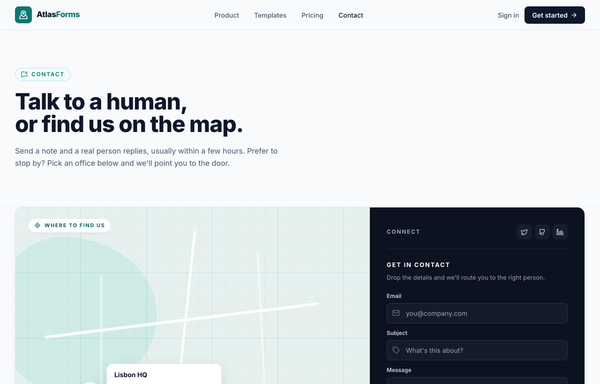
Contact & Where to Find Us - Atlas Forms (map-location teal)
A clean, modern LIGHT contact page for a forms-tool brand (AtlasForms), built around one signature pairing: a large CSS-only cartographic 'Where to find us' MAP panel beside a compact DARK form rail, inside a single rounded-2xl bordered white card split lg:grid-cols-[1.65fr_1fr]. A sticky blurred paper nav (a teal map-pin logo tile + an 'Atlas' + teal 'Forms' wordmark, Product/Templates/Pricing/Contact links with an animated teal underline, a 'Sign in' link and a dark 'Get started' button) tops the page; a full-bleed intro band carries a teal 'Contact' eyebrow pill, a 'Talk to a human, or find us on the map.' display headline and a reassuring lead. THE CONTACT CARD pairs a WIDE LEFT map/location panel (a faux-cartographic .map-grid canvas of soft teal land blobs + rounded white roads, a 'Where to find us' label pill, a teal map PIN with a white 'Lisbon HQ' callout of email + phone, and a 2/4-up city strip Lisbon / Austin / Amsterdam / Singapore with a teal active underline) with a NARROW RIGHT dark ink-950 FORM RAIL (a 'Connect' header with social icon tiles, a 'Get in contact' form of Email / Subject / Message dark inset fields with leading icons and a teal 'Send message' button, a 'reply within one business day' line, and an 'Office hours' block with day rows + an inline contact card of email / phone / address). Inter throughout, Lucide icons, a strict paper/ink/teal palette with hairline ink-200 borders, dark inset fields that focus to a teal ring, and box-shadows for the card / floating pin / button glow. The reusable signature is the MAP-BESIDE-DARK-FORM contact system: an asymmetric map-panel-beside-dark-rail card, a CSS-only cartographic map texture, and one calm teal accent. Mood: calm, trustworthy, modern, local and human, never a cold generic SaaS form.
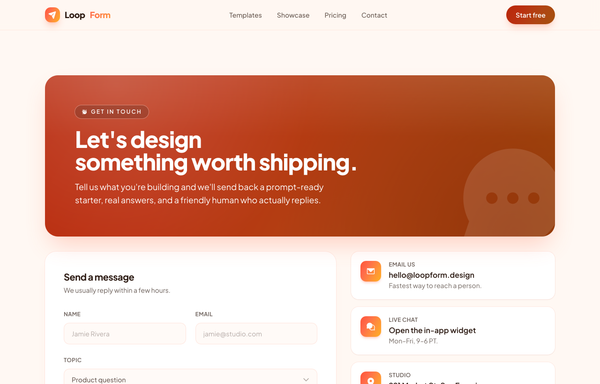
Gradient Band Sunset - Contact form (legibility fixed)
Warm sunset-gradient contact page for a design-tool brand (LoopForm), built around a legibility discipline: the bright coral->amber sunset is reserved for icon tiles only, while the header band and every white-text CTA use a deepened 'ember' register so white text clears WCAG 4.5:1 at every gradient stop. A sticky translucent cream nav (a sunset paper-plane logo tile + a 'Loop'/gradient-text 'Form' wordmark, Templates/Showcase/Pricing/Contact links and an ember 'Start free' pill) sits over a single contact section: a large rounded ember-gradient header band (a 'Get in touch' hand-wave pill, an extrabold white 'Let's design something worth shipping.' headline, a white intro line and a giant faint chat-bubble watermark) above a 12-column body split into a white form card (Name/Email row, a Topic select, a Message textarea, a coral-accent opt-in checkbox and an ember rounded-full 'Send message' pill) beside a quick-contact rail of three hover-lift chips fronted by bright sunset icon tiles (Email us / Live chat / Studio) plus a 'Find us online' social-icon card. A slim hairline footer closes it. A cream + coral->amber sunset palette with a Plus Jakarta Sans voice.
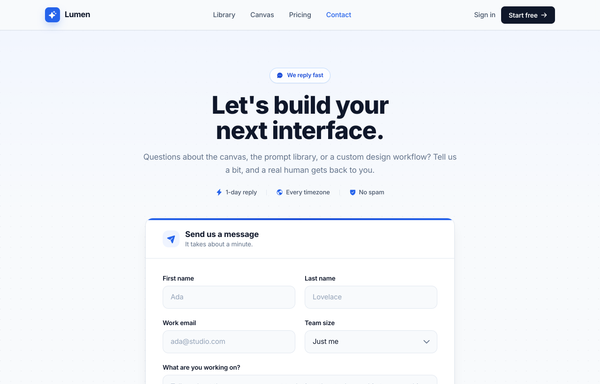
Let's build your next interface - Cobalt Contact
Full-bleed cobalt-on-white contact page for an AI product-design tool (Lumen): a sticky translucent nav and a centered 'Let's build your next interface.' headline with a 1-day-reply / every-timezone / no-spam trust line over ONE centered white card -- a 'Send us a message' header strip above a form (a first/last name row, a work-email + team-size select row, a 'What are you working on?' textarea, a Product/Billing/Partnership topic chip row and a cobalt 'Send message' CTA) topped by a cobalt gradient hairline -- then a labelled 'Other ways to reach us' divider into three hover-lift info cards (Help center / Community / Developer API) and a slim footer.
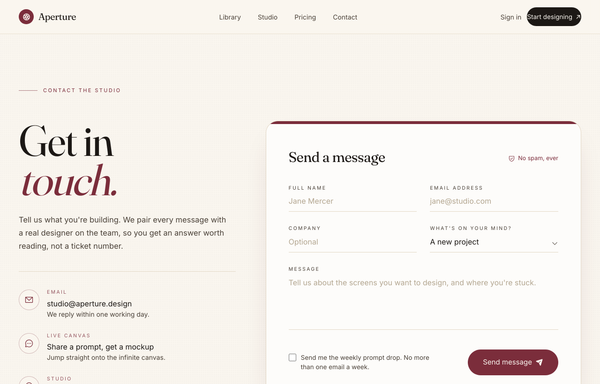
Letters to the Studio - An Editorial Get-in-Touch
Warm editorial-magazine contact page for a design studio (Aperture): a sticky cream nav, then an asymmetric two-column block on cream textured paper -- a left editorial column with an oversized Fraunces serif 'Get in touch.' headline (the second word a burgundy italic), a human intro, a hairline divider, a circular-outlined-icon contact list (Email / Live canvas / Studio) and a social-icon row, beside a white rounded form card (a burgundy top accent bar, a 'Send a message' serif header + a 'No spam, ever' shield chip, underline-only fields that turn burgundy on focus -- a name/email row, a company/topic-select row, a message textarea -- an opt-in checkbox and a burgundy pill 'Send message' submit), closed by a slim italic-serif footer. A cream + deep-burgundy palette with a Fraunces + Inter serif/sans pairing.
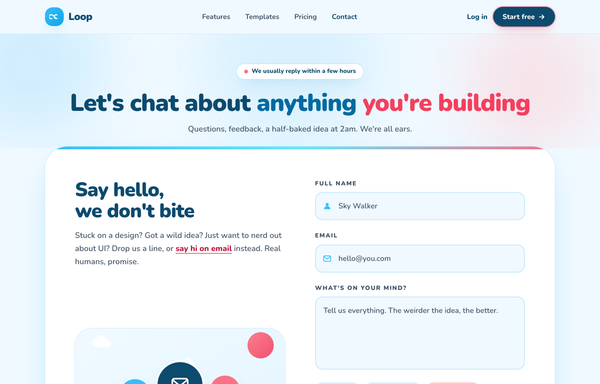
Loop · Say hello, we don't bite (friendly illustrated sky)
A warm, playful illustrated contact page (Loop) in a sky-blue + coral two-accent palette on a cloud-white canvas: a sticky blurred nav, a centered two-tone "Let's chat about anything you're building" hero with a pulsing reply-time pill, and one giant rounded white card splitting a hand-drawn CSS+SVG illustration panel (floating sun, clouds, channel bubbles, grass) and copy on the left against a multi-field form with icon-prefixed sky-ring inputs, emoji topic chips and a gradient send button on the right, then a row of three alt-contact cards and a deep sky-ink footer. Heavy rounded Nunito (up to black 900), bubbly corners, cheerful and human, never a cold corporate form.
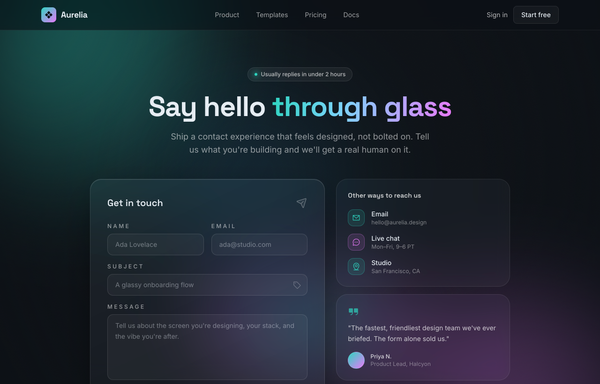
Say Hello Through Glass - Aurora Contact
Dark glassmorphism 'aurora' contact page for a design tool (Aurelia): a sticky translucent nav and a centered 'Say hello through glass' gradient headline over a two-column hero -- a large frosted-glass contact-form card (a name/email row, a subject field, a message textarea, a 'New project / Partnership / Just saying hi' chip row and an aqua-to-magenta gradient 'Send message' CTA) with inputs that glow aqua or magenta on focus, beside two soft-glass side cards (a tinted-icon contact list + a customer quote) -- all lit by drifting aqua/magenta/sky aurora blobs on a near-black ink canvas, then a logo trust strip, a 'Why the glass form' feature grid, a glass CTA banner and a slim footer.
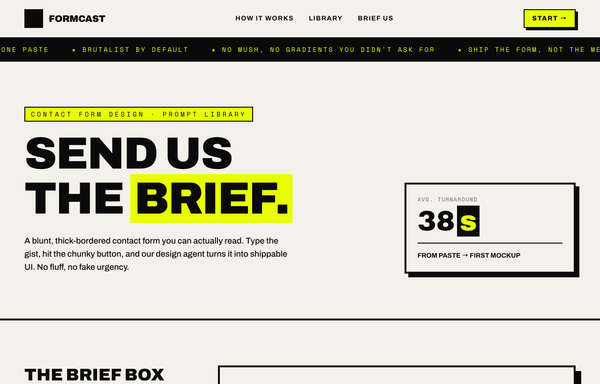
Send Us the Brief - Brutalist Contact Form
Loud neo-brutalist contact page for a design-tool brand (Formcast), built around a blunt two-field 'brief box'. A paper-and-ink base (paper #f4f1ea canvas, ink #0a0a0a text/borders) with exactly one high-voltage acid-yellow accent (#e8ff00), thick 2px/4px ink borders, hard offset drop shadows (zero blur, e.g. 8px 8px 0 0 #0a0a0a), depress-on-press chunky buttons, and an acid focus shadow on the fields, in a heavy Archivo (up to 900) + Space Mono pairing. A sticky paper nav (an ink+acid logo tile + a FORMCAST wordmark, How it works/Library/Brief us hover-fill links and an acid 'Start' button) sits over a scrolling ink marquee strip and a hero (an acid eyebrow pill, a giant uppercase 'SEND US THE BRIEF.' headline with 'brief.' highlighted in acid, and a '38s' avg-turnaround stat card). The centerpiece is a contact section split into a left rail of three numbered instruction tiles and a big bordered FORM CARD with an oversized E-Mail input + Message textarea, a Brutalist/Editorial/Minimal/Surprise-me style-chip row, and a chunky Cancel + acid 'Send' button row. A 'Three blunt steps' card row and a dark ink footer with an acid CTA close the page. The reusable signature is the neo-brutalist contact form: thick ink borders + hard offset shadows + one acid accent + a heavy Archivo/Space Mono voice.
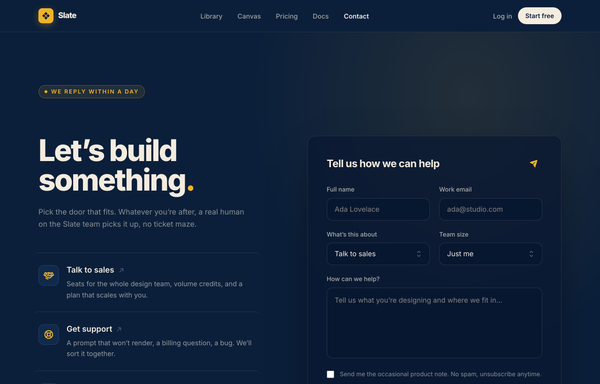
Talk to Slate - Contact (reasons-split-navy)
Warm, premium dark split contact page for an AI design-tool brand (Slate), modeled on Linear's 'Contact sales' layout but reskinned to a midnight-navy canvas with a cream text family and ONE amber/gold accent. A single full-bleed two-column contact section: a LEFT 'reasons to reach out' rail (an amber 'We reply within a day' status pill, a tight-tracking display headline 'Let's build something.' with an amber period, an intro line, and a three-row routed-reasons list with amber icon tiles for Talk to sales / Get support / Press & partners plus a mailto fallback) beside a RIGHT elevated form card ('Tell us how we can help' with a paper-plane glyph, a Full name + Work email row, a What's-this-about + Team-size select row, a textarea, an opt-in checkbox and a chunky amber 'Send message' button), with an 'Encrypted & never shared' reassurance line under it. A sticky blurred navy nav (an amber diamond logo tile + a Slate wordmark, Library/Canvas/Pricing/Docs/Contact links, a Log in link and a cream 'Start free' pill) tops the page; a thin hairline trust strip and a four-column dark footer close it. Inter throughout. Subtle dot-grain + warm radial-glow texture, hairline cream/10 borders, dark inset fields (bg #081730) that focus to an amber ring. The reusable signature is the warm-dark split-contact system: a navy canvas + a cream-opacity text ramp + exactly one amber accent, a tight-tracking Inter display headline with a single amber color hit, and an asymmetric reasons-rail-beside-elevated-form layout. Mood: calm, premium, confident and human, never a generic blue SaaS form.
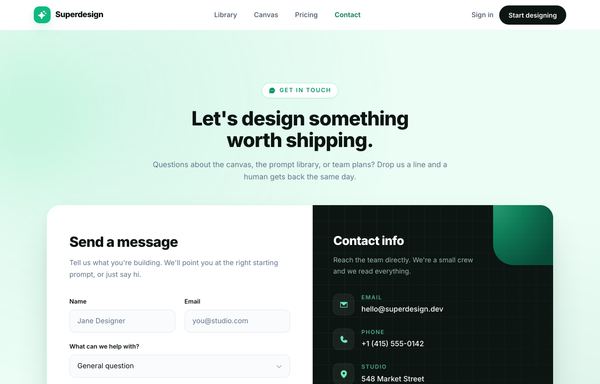
Talk to Superdesign - Contact (split-info-emerald)
Full-bleed emerald-on-white contact page for an AI product-design tool (Superdesign): a sticky translucent nav and a centered 'Let's design something worth shipping.' headline over one big white split card -- a left create-a-message form (name/email, a help-topic select, a message box and an emerald 'Send message' CTA) beside a right near-black info panel with gradient mesh corners, a faint grid, icon-tile email/phone/studio rows, a live 'Online now' availability pill and a social-chip row -- closing with a trust strip and a slim footer.
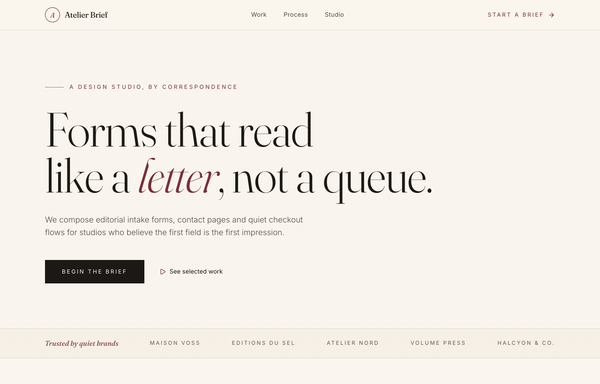
The Atelier Brief - an editorial intake form, set like a letter
An editorial intake form set like a letter: a warm cream page in Fraunces serif + Inter with a single burgundy accent, borderless underline inputs with serif labels (Name / E-mail, Project / Budget, Message), structured by full-bleed cream/ink/cream bands and hairline rules instead of cards, and a quiet ink 'Submit the brief' button.
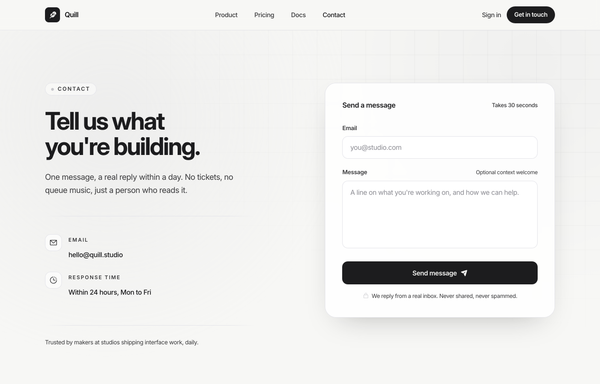
Whisper-Quiet Contact, Cast in Graphite (minimal-inline-graphite)
A whisper-quiet, premium LIGHT contact page for a calm product brand (Quill), built around one signature pairing: a restrained VALUE-PROP / context column on the left beside a compact INLINE form card on the right, the whole page rendered in a strict graphite-monochrome palette with ZERO accent hue (only graphite + a single platinum grey). A sticky blurred paper nav (an ink ph:feather-fill logo tile + a tracking-tightest 'Quill' wordmark, Product/Pricing/Docs/Contact links with Contact at full ink, a 'Sign in' link and an ink rounded-full 'Get in touch' CTA) tops the page over a full-bleed CSS background: a soft platinum grain wash under a hairline grid that fades in only from the top-right corner. THE CONTACT band splits mx-auto max-w-6xl grid-cols-1 -> lg:grid-cols-[1fr_0.92fr]: a LEFT VALUE-PROP column (a 'Contact' eyebrow pill with a platinum dot, a font-bold tracking-tightest 'Tell us what you're building.' headline, a one-line lead, a fading hairline rule, two icon meta rows Email + Response time, and a bottom 'Trusted by makers' trust line) beside a RIGHT compact INLINE FORM card (a rounded-3xl bordered white/85 backdrop-blur card with a 'Send a message' / 'Takes 30 seconds' header, an Email input + a Message textarea using light .field controls that focus to a soft platinum ring + an ink border, a full-width ink 'Send message' button with a paper-plane glyph and a hover lift, and a lock-icon privacy line). Inter throughout (tight, optical-size), Phosphor (ph:) icons, hairline mist borders, and a fading .rule divider. The reusable signature is the GRAPHITE-MONOCHROME INLINE-FORM contact system: a value-prop column beside a compact inline form card, exactly ZERO accent color (emphasis carried by weight + tracking + one platinum grey), and .field inputs that focus to a platinum ring instead of any colored highlight. Mood: quiet, premium, calm, restrained and human, never a loud or colorful SaaS form.
How to prompt a contact form that looks designed, not generated
An AI design agent has a strong default for a contact form, and most of those defaults add friction: a long stack of required fields, a required phone number, placeholder text used as labels in two columns, validation that only fires on submit, a lone card on a purple gradient, and a vague "Submit" button. A good prompt is really a list of constraints that override those defaults. Here is each default you need to override, the words that do it, and a template that bakes them all in.
Design a [light or dark] contact page for [product], a [what it is] for [who it is for].
Fields: ask for only [name, email and a message]. Do not require a phone number, and note that anything else (company, role, budget) is asked in the reply, not here.
Layout: a split page with the form on one side and a context panel on the other that names the response time ("we reply within one business day"), a direct email, and one or two other ways to reach you, so it is not a lone card on a blank page.
Labels and structure: a single column, with the label above each field, not placeholder text inside it.
Validation: validate inline as the visitor leaves each field, with a specific message like "Add the rest, like jane@acme.com", and include a clear success state after sending.
Primary action: one solid [Send message] button that names the outcome, with a short reassurance line under it ("We reply within one business day. No bots."). No Reset button.
Style: a neutral base with one [accent] color reserved for the button. Headline typeface [name], body [name], not the default Inter and no purple gradient.
Field count
Default: It asks for everything up front, a stack of first name, last name, email, phone, company, job title and subject, and makes the phone number required, which drives more abandonment than any field but a password.
Constrain it: Cap it at name, email and a message, never require the phone number, and say the rest is asked in the reply, not at the door.
A panel beside the form
Default: It centers a lone form card on a blank or gradient canvas, with nothing to tell a stranger who answers, how fast, or how else to reach you.
Constrain it: Use a split layout: the form on one side, a context panel on the other naming the response time, a direct email, and one or two other ways to reach you.
Labels and one column
Default: It uses placeholder text inside the fields as the only label and splits the form into two columns, so the hint disappears the moment you start typing.
Constrain it: Put the label above each field, not inside it, and lay the form out in a single column so the eye runs straight down.
Inline validation and a success state
Default: It checks nothing until you hit submit, then shows one vague red banner and leaves you hunting for which field broke, and it builds no confirmation that the message actually sent.
Constrain it: Ask for inline validation as the visitor leaves each field, with a specific message that names the fix, plus a clear success state after sending.
The submit button
Default: It drops a gray "Submit" button, often beside a "Reset" that wipes the form on a misclick, and the action says nothing about what happens next.
Constrain it: Use one solid primary button that names the outcome, like "Send message", with a short reassurance line under it, and drop the Reset button.
Color and type
Default: Left alone it defaults to Inter, a dark theme with a purple gradient, and rainbow accents used as decoration.
Constrain it: Name a headline and body typeface and one accent color on a neutral base, and reserve that color for the primary button.
Frequently asked questions
What makes a good contact form?
Low friction and clear expectations. Ask for two or three fields at most, never require a phone number, lay it out in a single column with labels above each field, validate inline as the visitor goes, and pair the form with a short panel that says who answers and how fast. The best contact forms feel like a quick note, not a job application.
How many fields should a contact form have?
As few as you can get away with, usually three: a name, an email, and a message. Research on form completion is consistent that fewer fields convert better, and the phone number field has one of the highest abandonment rates of any common field. Ask for company, role or budget in the reply, after the conversation has started, rather than at the door.
Why does my AI-generated contact form look generic?
Because a vague prompt gets the model defaults: a long stack of fields with a required phone number, placeholder text used as labels in two columns, a lone card on a dark purple gradient, the Inter typeface, and a vague Submit button. Cap the fields, add a context panel, move labels above the fields, name one accent color and a non-default typeface, and it stops reaching for the average.
Should a contact form ask for a phone number?
Usually not. The phone number field has one of the highest abandonment rates of any common form field, behind only password, so requiring it costs you messages. If you genuinely need it, make it clearly optional rather than required, or ask for it later once the person has replied.
How do you write a prompt to generate a contact form UI?
Describe the brief, not the vibe: the product and who it is for, the two or three fields you actually need, a context panel beside the form with the response time and other ways to reach you, labels above each field in a single column, inline validation and a success state, one Send message button with a reassurance line, one accent color, and a named typeface. The template above walks through each part, and you can open any example here to see a full prompt that works.
Can I use my own brand colors and copy?
Yes. Generate the layout first, then describe your accent color, typeface, headline and the fields you want in plain language and branch a variant. Every design comes back as real, editable code, so wiring in your form handler and brand happens in your own repo, not a rebuild from a picture. Stuck on something? Ping us and we will sort it out together.