Design prompts for carousels
A carousel is a way to fit a set of peers into one slot: product shots, testimonials, logos, onboarding screens. It earns its place only when people are browsing options they came to compare, and only when they stay in control of the movement. The ones that work lead with the strongest slide, show a peek of the next so you know there is more, give you real prev and next controls, never auto-rotate something important out from under you, and stay reachable by keyboard. The prompts below are the most-copied carousel and slider designs in the Superdesign library, from card-swap showcases and image carousels to testimonial sliders, logo marquees and 3D coverflow. Open any one to see the exact prompt behind it, then tweak the copy and generate your own editable version in seconds.
Card Swap
An elegant card swapping animation component with depth perception and perspective. Features automated cycling of cards with a premium floating feel. Source: ReactBits
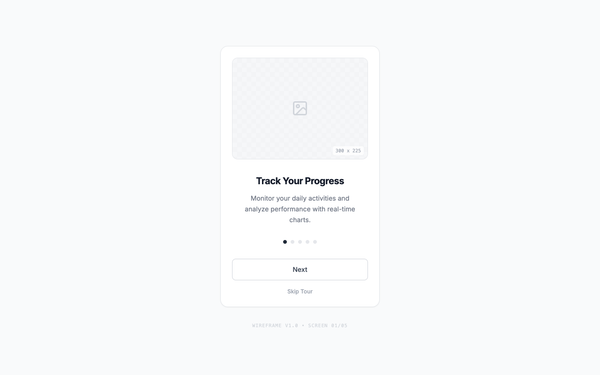
Interactive Onboarding Carousel
A minimal, functional onboarding carousel with five steps, featuring smooth sliding transitions. Users can navigate forward and backward with Next/Previous buttons or jump directly via clickable pagination dots. JavaScript manages step state, updates titles, descriptions, and active indicators, while subtle CSS transitions maintain a clean wireframe aesthetic throughout the experience.
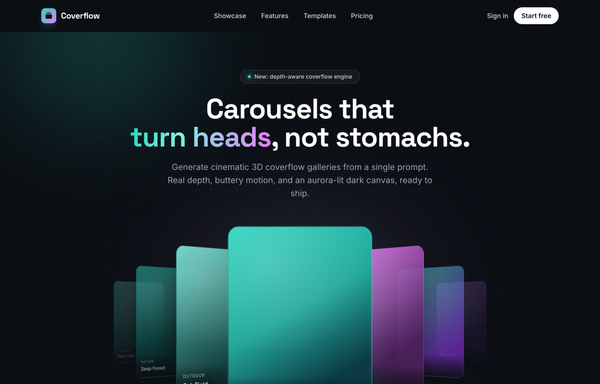
Coverflow - Carousels that turn heads (dark coverflow aurora)
A dark, aurora-lit 3D coverflow carousel landing page: a sticky frosted-ink nav, then a centered hero (a 'depth-aware coverflow engine' status pill, a big 'Carousels that turn heads, not stomachs.' heading whose 'turn heads' is teal-to-magenta gradient text, and a soft lead) wrapping a real CSS 3D coverflow stage. Seven gradient cards sit on a 1600px perspective stage: the active card faces front with a teal glow ring while neighbours rotate ~42-48deg and recede in Z, scaling and fading by distance, each card carrying a top-left sheen and a bottom gradient label. Below the stage, a round glass prev button, pill dots (active = a wide teal-to-magenta gradient bar), and a next button; clicks, dots, arrows and the left/right keys re-lay the stage. Then a CTA pair, a grayscale logo strip, a 3-up glass feature grid, a 'from prompt to motion' showcase split with a faux terminal card, a gradient-thumb templates grid, a dark gradient CTA, and a social footer. Inter + Space Grotesk fonts, near-black ink #0b0f14 ground, aqua #2dd4bf + magenta #e879f9 accents, glass panels and aurora blobs, Iconify Phosphor icons; responsive geometry drops far cards on small screens and collapses the nav into a hamburger.
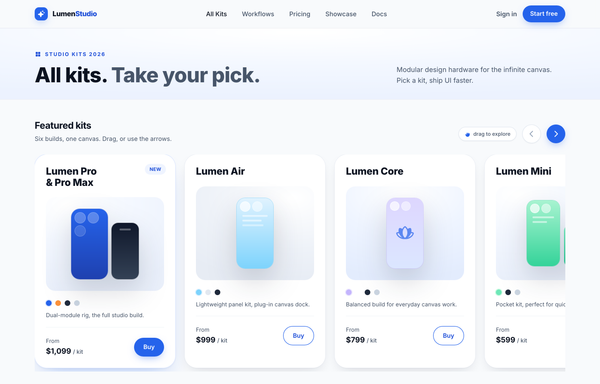
All Kits. Take Your Pick. - LumenStudio Kit Carousel
A light, Apple-Shop-style product-card carousel: a horizontal scroll-snap track of tall white kit cards (the first highlighted with a 'New' badge + cobalt ring + lift, the next peeking past the right edge), circular prev/next arrows, color-swatch dots, and a thin cobalt progress bar with an 01/06 counter, all on near-white surfaces with a single cobalt-blue accent and Inter type.
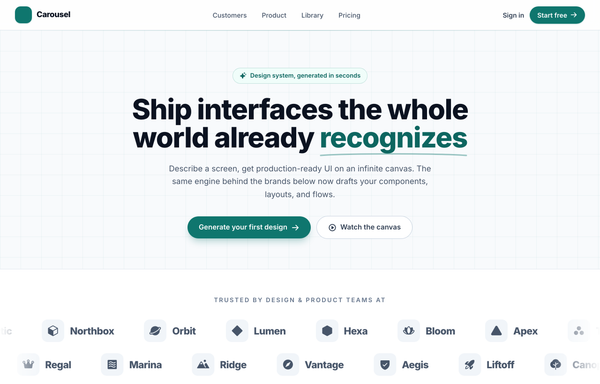
Carousel - Logo Marquee (teal)
A clean, light SaaS landing page built around an infinite logo-marquee carousel: a sticky frosted white nav (a teal rounded-square carousel-icon logo + a 'Carousel' wordmark, a hidden-on-mobile link row -- Customers / Product / Library / Pricing -- a ghost 'Sign in' link and a solid teal 'Start free' pill, plus a mobile hamburger), then a centered grid-textured hero (a teal 'Design system, generated in seconds' status pill, a big 'Ship interfaces the whole world already recognizes' heading whose 'recognizes' is teal with a hand-drawn SVG underline swash, a soft lead, and a primary teal 'Generate your first design' button + a ghost 'Watch the canvas' button). The anchor section is a two-row trusted-by logo marquee: 'Trusted by design & product teams at', then two edge-faded infinite-scroll rows of icon+wordmark logo chips (the top row scrolls left at 40s, the bottom row scrolls right at 28s), each row duplicated twice so the CSS translateX(-50%) loop is seamless, with a left/right transparent mask fade at the edges and a hover-to-pause + per-logo teal tint. Below it: a 4-up metric trust strip (57k+ / 2.4M / 4.9/5 / 12s) in a hairline-divided rounded card, a 3-up feature grid (Prompt to mockup / Infinite canvas / Clean export), a teal gradient CTA card with corner glow blobs, and a social footer. Inter font, teal #0f766e + #0d6660 + #115e59 accents on a slate #f8fafc ground, Iconify Phosphor icons, and a responsive reflow that collapses the nav into a hamburger.
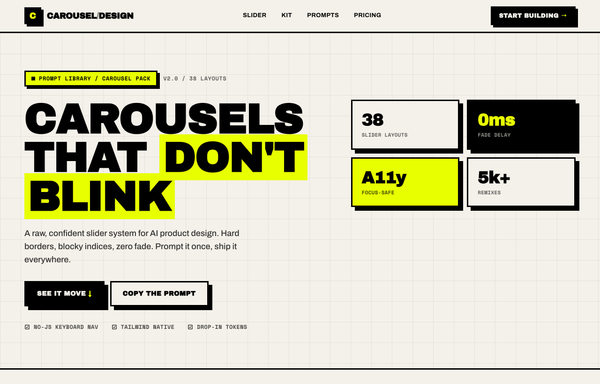
Carousel Design - Brutalist Slider
A raw neo-brutalist slider carousel built as a complete one-screen 'Carousel/Design' landing on an off-white paper palette (#f4f1ea) with pure-black ink and a single acid-yellow accent (#e8ff00). Hard 3px black borders, blocky offset drop shadows (8px 8px 0 #000), heavy Archivo Black uppercase headlines and Space Mono labels. A sticky paper nav with a square 'C' logo sits over a grid-paper hero (a 'CAROUSELS that don't blink' headline with an acid highlight + a 2x2 brutalist stat-slab grid). The centerpiece is a no-JS radio-driven BRUTALIST SLIDER: a bordered slide panel with a hard acid+ink offset shadow, chunky square prev/next arrow buttons, an oversized blocky numeral index in an inverted ink/acid slab, and a row of 3 square index buttons; three slide layouts (acid 'Stacked panel', paper 'Split feature', inverted-ink 'Invert hero') snap with zero fade. Below: a scrolling ink marquee strip, a 6-up bordered feature 'Kit' grid, a 'prompt.txt' code slab with acid-highlighted tokens, a 3-tier brutalist pricing grid, an acid CTA band and a paper footer. Archivo / Archivo Black / Space Mono, Iconify Phosphor icons, tactile press (buttons travel on click), fully responsive.
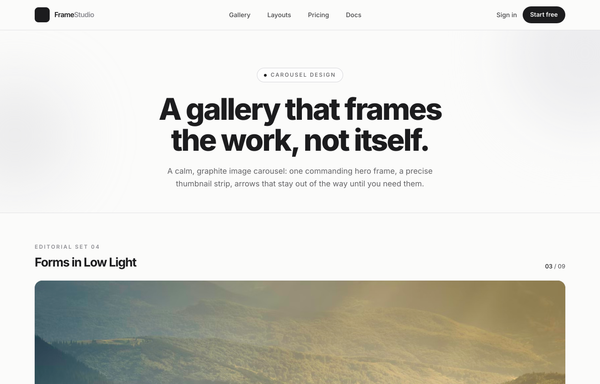
Forms in Low Light - A Graphite Image Carousel
A calm, editorial image carousel built as a complete one-screen gallery landing on a graphite + off-white 'paper' palette with a single platinum accent. A sticky translucent paper nav over a centered hero band (a 'Carousel Design' pill eyebrow, an extrabold tight-tracked 'A gallery that frames the work, not itself.' headline, a muted intro line), then the carousel: a meta row ('Editorial Set 04' / 'Forms in Low Light' + an '03 / 09' counter) above a single commanding 16:9 hero frame on a near-black graphite stage with a soft bottom vignette, quiet glass prev/next caret arrows that stay calm until hover, a bottom-left 'Frame 03 / Ridge at Dusk' caption, a bottom-right glass play/fullscreen cluster and centered dot pagination, synced to a horizontally-scrolling thumbnail strip whose active thumb wears a double-ring highlight (the rest at 55% opacity, brightening on hover, the right edge masked). Below: a hairline-gridded three-up feature row, a full-bleed dark graphite palette section with a four-swatch ramp (#1c1c1e / #2c2c2e / #c7c7cc / #fbfbfa) and an 'Open the editor' CTA, and a paper footer. Inter throughout with tight display tracking.
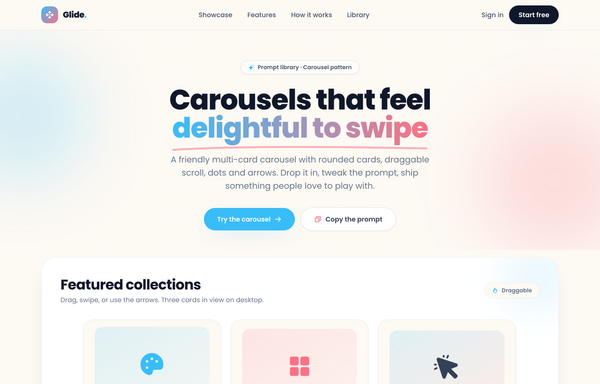
Glide - Carousels that feel delightful to swipe
A cheerful, friendly multi-card carousel built as a complete one-screen 'Glide' landing on a warm cream palette with a sky-blue + coral gradient accent. A sticky translucent cream nav over a centered hero (a 'Prompt library . Carousel pattern' pill eyebrow, an extrabold 'Carousels that feel delightful to swipe' headline whose 'delightful to swipe' runs a sky-to-coral gradient clip under a hand-drawn coral underline squiggle, a muted intro line, and a 'Try the carousel' / 'Copy the prompt' button pair). Then the carousel inside a big white rounded showcase panel: a 'Featured collections' meta row + a 'Draggable' pill above a draggable, scroll-snapping track of rounded cream cards (three in view on desktop, two on tablet, one peeking on mobile), each with a floating gradient icon tile, a numbered category pill, a title, a description and a swatch/feature footer, driven by rounded prev/next arrows that hover to the accent color and a dot-pagination row whose active dot stretches into a sky pill. Below: a full-bleed white 'Why Glide' feature band (a three-up card row), a 'How it works' two-column section with a floating 'prompt.txt' code-card mock, a full-bleed sky-to-coral gradient CTA panel, and a cream footer. Poppins throughout, Iconify Phosphor icons, cheerful and soft.
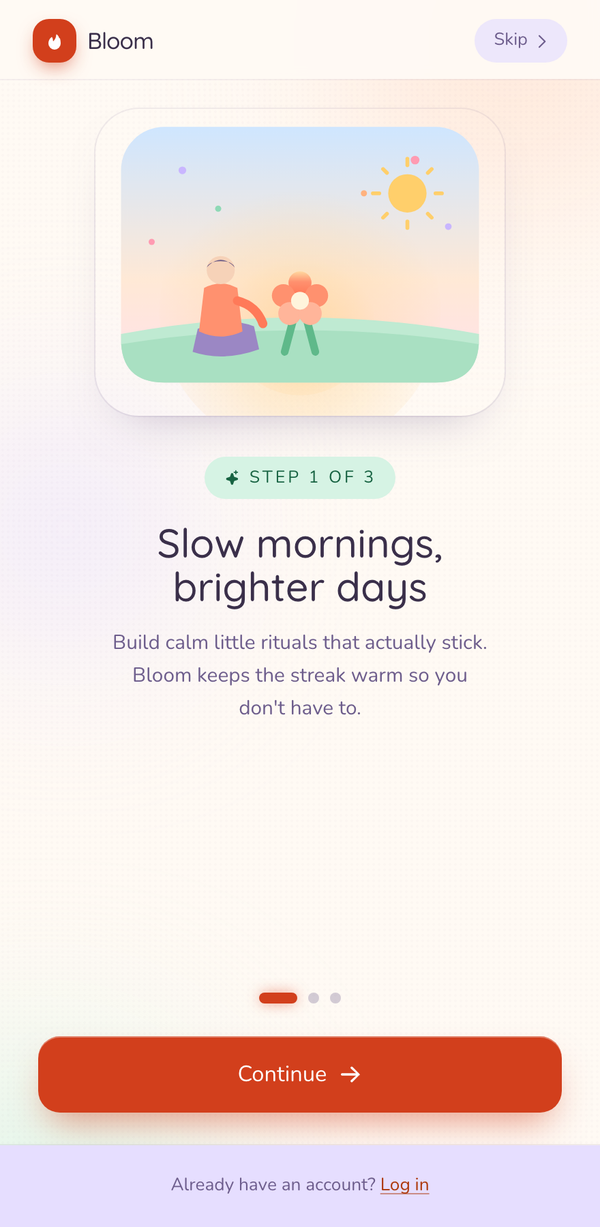
Pastel Bloom Onboarding
A playful pastel mobile onboarding screen: soft cream/peach/lilac ground, a mint illustration card, a STEP eyebrow + bold headline, animated progress dots, and a single confident coral "Continue" CTA.
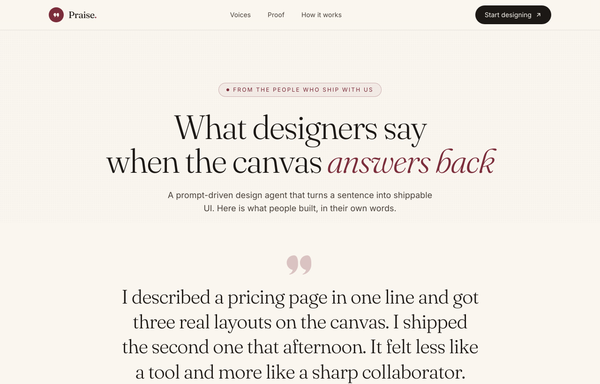
Praise - What designers say when the canvas answers back
An editorial one-quote-at-a-time TESTIMONIAL CAROUSEL on warm cream paper: a big soft-serif Fraunces blockquote with a burgundy quote mark above a gradient monogram avatar, cross-fading slides with circular prev/next arrows and a dot row whose active dot stretches into a burgundy pill, embedded in a full one-pager (sticky nav, hero, dark-ink stats strip, how-it-works cards, burgundy CTA) with a single deep-burgundy accent.
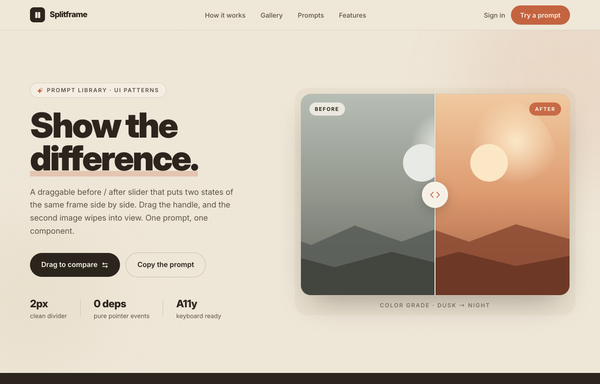
Splitframe - Show the Difference
A warm sand/terracotta landing page for a draggable before/after image-comparison slider: a bold black 'Show the difference.' hero with a circular-grip comparison frame (warm dusk 'After' wiping over cool night 'Before'), a dark marquee, a 3-step how-it-works grid, a 2-up gallery of more sliders, a copy-the-prompt code block and a terracotta CTA. Inter, single terra accent on sand neutrals, sticky translucent nav, reflows to one column below lg.
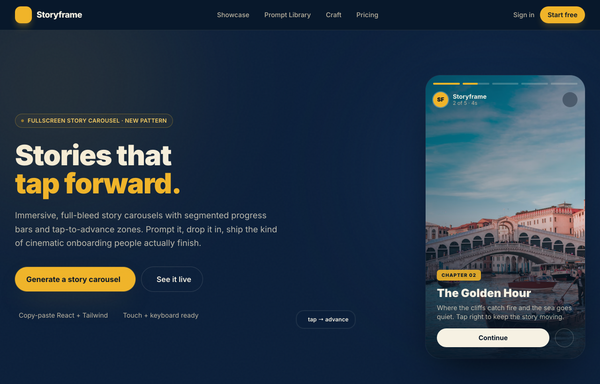
Storyframe - Stories That Tap Forward
A cinematic, full-bleed fullscreen story carousel built as a complete one-screen 'Storyframe' landing on a deep-navy palette with a single amber accent and warm cream text. A sticky translucent navy nav over a two-column hero: a 'FULLSCREEN STORY CAROUSEL . NEW PATTERN' pill eyebrow with a pulsing amber dot, a black 'Stories that tap forward.' headline (amber highlight), a cream intro and a 'Generate a story carousel' / 'See it live' button pair, beside the centerpiece: a 9/16 phone-shaped story-card mock with five segmented progress bars across the top (one animating on a 5s fillbar keyframe), a story meta row (an 'SF' avatar + 'Storyframe' + '2 of 5 . 4s'), left/right tap-to-advance zones that reveal a circular arrow on hover, and a bottom caption block (a 'Chapter 02' amber tag, a 'The Golden Hour' title, a Continue + bookmark button row), with a floating 'tap -> advance' accent card. Below: a trust strip, a 'Showcase' three-up full-bleed story-card gallery (each reusing the segmented-bars + tag + caption pattern), a full-bleed 'Prompt Library' two-column section with a 'story-carousel.prompt' code card, a 6-up bordered 'Craft' feature grid, a full-bleed gradient CTA panel and a navy footer. Inter throughout, Iconify Solar icons, immersive and cinematic.
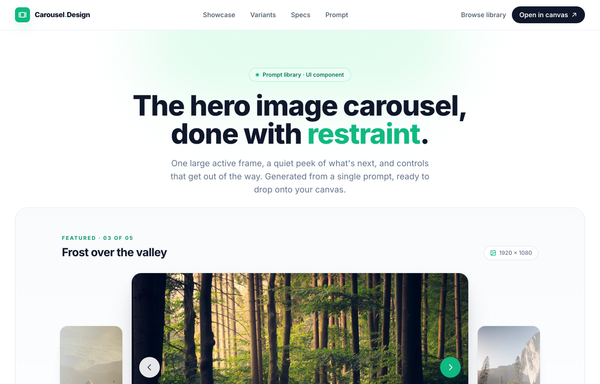
The hero image carousel, done with restraint
A restrained, light hero-image carousel: one large 16:9 active frame flanked by soft-faded peek frames, a thin emerald progress bar, stretched-pill dot indicators, and a thumbnail strip, all on near-white surfaces with a single emerald accent and Inter type.
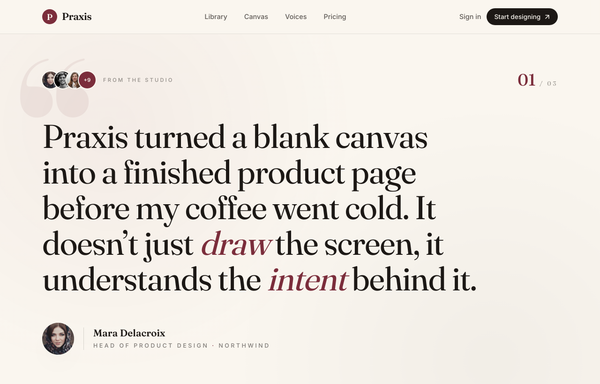
The Quote, Set in Burgundy
A magazine-style single-slide testimonial on a warm cream canvas: one oversized Fraunces serif pull-quote with burgundy italic emphasis, a ghosted giant quote mark, an avatar trust cluster, a portrait byline, and prev/next carousel chrome with progress dots.
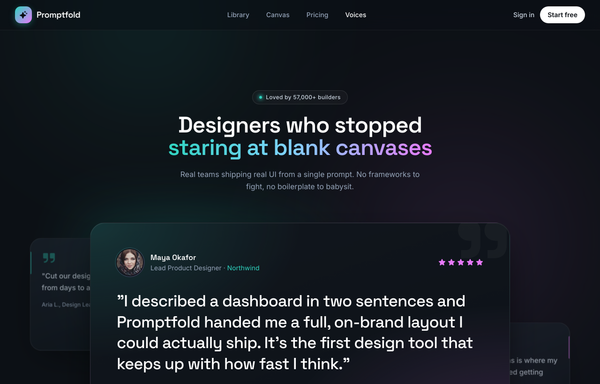
Voices from the Canvas - Aurora Carousel
Dark aurora-glow testimonial CAROUSEL section for a prompt-to-UI product: a sticky glass nav, a centered header (live-dot 'Loved by 57,000+ builders' badge + a Space-Grotesk headline whose tail is painted in an aqua->sky->magenta aurora gradient), and a big glass 'stage-card' carousel holding the active testimonial (aurora-ring avatar, name/role with the company in aqua, five magenta stars, a large pull-quote, a hairline divider, animated aqua->magenta pagination pill + glass/solid-white prev/next arrows), with two rotated, floating ghost peek cards behind it and a three-up trust-stats strip (4.9/5, 120k+, 9x) below, over a grain + ambient aqua/magenta glow ground. Space Grotesk + Inter, Phosphor icons, vanilla-JS slide engine.
How to prompt a carousel that looks designed, not generated
An AI design agent has a strong default for a carousel, and most of those defaults are the things usability research warns against: a full-bleed hero that auto-rotates every few seconds, a single set of tiny dots, no sense of how many slides there are, and no keyboard support. A good prompt is really a list of constraints that override those defaults. Here is each default you need to override, the words that do it, and a template that bakes them all in.
Design a [type] carousel for [the set of peers it holds, e.g. product photos, testimonials, customer logos] that someone is browsing to [the decision it supports].
Use a carousel only because these are peers worth comparing in one slot. If one slide is an important promo or CTA, pull it out into a static block instead.
Rotation: do not auto-advance. If it must, set 5 to 7 seconds per slide, pause on hover and on focus, and show a visible pause button.
Controls: large prev and next buttons (about a 62px target), grouped close together, plus a clickable position indicator. Lead with the strongest slide.
Position and peek: show where you are with a "[n] of [total]" label, and crop the next slide so a slice peeks in to signal there is more.
Each slide: real content, [the headline and image per slide], not a placeholder. Keep slide heights equal.
Accessibility: arrow-key navigation, role="group" with aria-roledescription="carousel" on the container and "slide" on each item, announce the current slide, and swipe on mobile with the buttons still present.
Style: a neutral base with one [accent] color for the active dot and the controls, a named typeface (not the default Inter), and no heavy gradient or drop shadow.
When to use one
Default: It reaches for an auto-rotating hero carousel to hold an important promo or call to action, the one thing it should never bury in a slider. Erik Runyon found only about 1% of visitors click a slide, and 89% of those click only the first.
Constrain it: Reserve the carousel for peers people are browsing to compare (a gallery, testimonials, logos) and pull any single important message out into a static block.
Auto-rotation
Default: It auto-advances every few seconds with no way to pause, so slow readers, screen reader users and anyone reading in a second language lose the slide before they finish. Nielsen Norman Group calls auto-forwarding a conversion killer.
Constrain it: Say no auto-advance, or if it must rotate, set 5 to 7 seconds per slide, pause on hover and on focus, and add a visible pause button.
Navigation controls
Default: It ships a single row of tiny 3px dots and no buttons, so there is nothing big enough to click and dragging is the only way to move.
Constrain it: Ask for large prev and next buttons, about a 62px target, grouped close together, with the dots as a secondary position indicator. Smashing Magazine recommends never relying on dots alone.
Position and peek
Default: It shows one full-bleed slide at a time with no count, so a visitor has no idea how many slides there are or where they are in the set.
Constrain it: Require a "[n] of [total]" label and crop the next slide so a slice peeks in. The peek is the strongest signal that more content is there.
Accessibility
Default: It builds the carousel from bare divs with no roles, no keyboard support and no labels, so it is invisible to a screen reader and unusable without a mouse.
Constrain it: Ask for arrow-key navigation, role="group" with aria-roledescription="carousel" and "slide", a current-slide announcement, and pause on focus. This is the W3C ARIA carousel pattern.
Look and type
Default: Left alone it reaches for a purple gradient, the Inter typeface, and a heavy drop shadow, the look of every AI carousel on the internet.
Constrain it: Name a neutral base, one accent color for the active dot and the controls, a real typeface, and no heavy gradient or shadow.
Frequently asked questions
What is a carousel in web design?
A carousel, also called a slider or slideshow, shows a set of content frames in a single slot that you move through one or a few at a time. The frames can be images, product cards, testimonials, or logos. A slider usually shows one frame at a time, while a carousel often shows several with a peek of the next, but the terms are used interchangeably.
Are carousels good or bad for UX?
They are good when people are actively browsing peers they came to compare, like product photos or testimonials, and bad when you hide an important promo or call to action inside one. The fix is control: lead with the strongest slide, never auto-rotate important content, give real prev and next buttons, and let people pause. Nielsen Norman Group recommends a static hero over an auto-rotating one for anything that matters.
Should a carousel auto-rotate?
Usually no. Auto-rotation moves the content before slow readers, screen reader users, and people reading in a second language can take it in, and most visitors tune it out as an ad. If you must auto-advance, give each slide 5 to 7 seconds, pause on hover and on focus, and show a visible pause button so people can stop it.
Why does my AI-generated carousel look generic?
Because a vague prompt gets the model defaults: a full-bleed purple gradient hero that auto-rotates every few seconds, the Inter typeface, a single row of tiny dots, and no keyboard support. Name what the slides hold, turn off auto-rotation, ask for large prev and next buttons, a "3 of 8" position with a peek of the next slide, the ARIA roles, and one accent on a neutral base, and it stops reaching for the average.
How do you write a prompt to generate a carousel UI?
Describe the brief, not the vibe: the peers each slide holds, why a carousel fits instead of a static block, the rotation rule (ideally none), large prev and next controls, a position indicator with a peek of the next slide, the keyboard and ARIA behavior, and one accent color on a neutral base. The template above walks through each part, and you can open any example here to see a full prompt that works.